

RAG & Deep Research for Internal Documents: Why n8n Is the Ultimate Enterprise Control Plane
.jfif/v1/fill/w_320,h_320/file.jpg)

If you have spent any time on sales calls with enterprise CTOs, Chief Data Officers, or VPs of Engineering over the past year, you have likely heard a variation of this exact frustration:
"We spent six months and $150,000 building a RAG prototype. It works great when demoing three clean PDFs. But when we point it at our 50,000 internal documents across SharePoint, Confluence, and Google Drive, it gets confused, breaks on permissions, takes 45 seconds to answer, and our security team won't let us push it to production."
It is the dirty secret of enterprise AI: retrieval-augmented generation (RAG) is easy to prototype, but painfully hard to operationalize.
When leadership asks for a "Deep Research Assistant for internal documents," they aren't asking for a basic search box. They are asking for a system that can take a complex prompt, retrieve facts across thousands of private enterprise files, cross-reference those facts with live real-time web data, respect strict employee permission hierarchies, cite its sources down to the exact paragraph, and do it all in seconds without leaking company IP.
Most teams try to solve this in one of two ways:
They buy a closed, off-the-shelf SaaS chatbot (and discover they can't customize its logic, connect custom APIs, or control data residency).
They hire Python developers to write custom scripts (and discover that maintaining custom ingestion pipelines, vector syncs, and error handling requires a dedicated MLOps team).
There is a third way, one that leading enterprise engineering teams are quietly standardizing on: using n8n as the sovereign visual orchestration engine and control plane.
In this playbook, we are going to pull back the curtain on how modern enterprises build production-grade, self-hosted Internal Deep Research systems using n8n. We will address the exact technical and operational questions that come up during enterprise proposal calls, examine real-world case studies with verified metrics, and explain why visual workflow orchestration is outperforming custom code in production.

The Jan Oberhauser Perspective: Why "Sprinkling AI" Fails in the Enterprise
To understand why n8n has emerged as the preferred architecture for enterprise RAG, it helps to understand a fundamental shift in how AI is integrated into business operations.
Jan Oberhauser, Founder and CEO of n8n, has frequently highlighted a core mistake that early enterprise adopters made:
"All of us, including ourselves honestly, were just sprinkling some AI on top. Then we thought: to really make use of it, we need to be part of the value chain, not people using AI for anything, but people building AI-powered applications and agents inside workflows."
Oberhauser often compares foundation models to a high-performance engine: an engine is useless without the vehicle, the streets, the steering, and the traffic signals. In the enterprise world, n8n is the vehicle and the traffic infrastructure.
When you build internal document research into n8n, you are not just querying a language model. You are creating a deterministic, auditable control plane that governs:
How data enters the system (ingestion queues, webhooks, delta syncing).
Who is allowed to see what (identity-aware filtering, role-based access control).
How errors are handled (automatic retries, fallback routing, human-in-the-loop gates).
Where the data resides (100% self-hosted inside your cloud VPC).
As Oberhauser notes, enterprise AI requires "deterministic constraints with human legibility." If an executive cannot open a visual dashboard and inspect the exact path a query took which vector store was hit, which web API was called, and which prompt template was used, then that system is not ready for production governance.

The Core Question Buyers Ask: "Why n8n Instead of Custom Code or Closed SaaS?"
During proposal and discovery calls with enterprise technology leaders, we are almost always asked to justify the architecture. The decision matrix typically boils down to three paths:

Here is how these options compare across the dimensions that matter to enterprise procurement and engineering teams:
Evaluation Dimension | Closed Enterprise SaaS | Custom Python Scripts | n8n Visual Control Plane |
Data Sovereignty & Residency | Low (Data processed on vendor cloud) | High (Runs in your VPC) | Complete (100% Self-Hosted in your VPC) |
Document Permission (RBAC) Sync | Opaque / Vendor dependent | High dev effort to write custom ACL handlers | Native & Configurable via identity tokens |
Real-Time Web + Doc Hybrid Search | Fixed to vendor's search engine | Complex custom API wiring | Drag-and-Drop Multi-Source orchestration |
Visual Observability & Debugging | Zero visibility (Black box) | Requires custom logging frameworks (LangSmith) | Native Visual Execution Tracing node-by-node |
Maintenance & Scraper Upkeep | Vendor dependent | High (30–40% dev bandwidth spent fixing breaks) | Low (Decoupled, visual error-handling loops) |
Long-Term Cost Model | High per-seat recurring Tax | High engineering headcount cost | Fixed Infrastructure + Direct API Rates |
The Real Reason Python-Only RAG Hardens into Technical Debt
Writing a 50-line Python script using a framework like LangChain to query a vector database takes an afternoon.
Maintaining that script in production when SharePoint updates its API, when a PDF parser crashes on a corrupted scanned image, when Pinecone rate-limits your ingestion batch, and when three different business units demand different document access rules takes months of ongoing engineering time.
With n8n, your engineering team stops writing boilerplate integration code. Instead, n8n acts as the visual orchestration layer where ingestion, vector indexing, permission filtering, and web fetching are represented as distinct, modular, and observable nodes. If a third-party API changes, you update a single node configuration rather than refactoring a codebase.

The Architecture of an Enterprise Internal Deep Research Engine in n8n
A production-grade internal research system in n8n does not rely on a single monolithic workflow. Instead, it uses a Dual-Workflow Architecture.
Let's break down how these two pipelines function in practice.
Pipeline 1: Event-Driven Document Ingestion & Incremental Indexing
The biggest mistake teams make with internal documents is doing full bulk re-indexing every night. Re-indexing 50,000 documents daily burns massive compute, incurs unnecessary embedding API charges, and leads to stale data during operating hours.
n8n solves this with an incremental, event-driven ingestion pipeline:
Event Triggers: n8n listens for real-time webhooks from enterprise storage engines (e.g., a file updated in SharePoint, a new page created in Confluence, or a contract uploaded to Google Drive).
Document Parsing & Text Extraction: The workflow routes the incoming file through specialized parsing modules that strip headers, footers, boilerplate, and formatting junk while preserving table structures and metadata tags (author, department, creation date, access clearance).
Semantic Chunking Strategy: Instead of fixed 1,000-character windows, n8n applies semantic chunking—breaking text by section headers, logical paragraphs, or table boundaries (typically targeting 200–500 token semantically coherent blocks).
Cryptographic Hashing (Cost Saver): Before calling embedding APIs, n8n generates an MD5/SHA-256 hash of the chunk content. If the chunk hasn't changed since the last sync, indexing is skipped—saving up to 80% on vector DB and embedding API bills.
Vector Storage Synchronization: Cleaned chunks with attached metadata are written to your self-hosted vector database (e.g., pgvector inside PostgreSQL, Qdrant, or Weaviate).

Pipeline 2: Real-Time Deep Research & Hybrid Retrieval
When an employee asks a complex question such as "Summarize our compliance risks for Vendor X based on our historical master service agreements and recent 2026 news updates" n8n executes an on-demand, multi-step research loop:
Identity & Clearance Token Ingestion: The workflow captures the user's corporate identity token (from SAML/Okta/Active Directory), extracting their group memberships and clearance level.
Intent Deconstruction & Sub-Query Generation: The visual workflow uses an LLM node to break the complex prompt into separate research threads:
Thread A: Internal MSA & contract clauses (internal vector DB query).
Thread B: Internal compliance audit notes (internal vector DB query).
Thread C: Recent external news & regulatory actions regarding Vendor X (live web API / SERP query).
RBAC-Filtered Vector Retrieval: n8n queries the vector database using metadata filters that match the employee's clearance. If an employee lacks access to executive compensation files, those chunks are structurally excluded at the database layer before the LLM ever sees them.
Real-Time Web Harvesting: Simultaneously, n8n executes web search queries to fetch up-to-the-minute external context.
Hybrid Triangulation & Cross-Encoder Reranking: n8n combines internal vector chunks and live web results, running them through a reranking node (e.g., Cohere Rerank or open-source cross-encoders) to select top-scoring, non-redundant contexts.
Synthesis with Explicit Citation Footprints: The final answer is generated with inline citations linking directly to internal document IDs, page numbers, and external web URLs.


Want to dive deeper into enterprise AI automation? Here are a few related guides that complement the concepts discussed in this article:
Build Intelligent Lead Qualification Workflows with n8n — Design AI-powered workflows that score, enrich, and route leads automatically.
Automate End-to-End Lead Generation with n8n — Build scalable lead generation pipelines using AI, web scraping, CRM integrations, and automation.
Planning Agents in n8n: Breaking Complex AI Workflows into Governed Executable Steps — Learn how planning agents decompose complex tasks into reliable, production-ready execution plans.
Building an Enterprise AI Deep Research Agent with n8n, Apify & OpenAI o3 — Explore the architecture behind autonomous AI research systems that collect, verify, and synthesize information.
Build a Multi-Agent AI Banking Document Processing Platform with n8n — See how multiple AI agents collaborate to process complex banking documents with enterprise-grade reliability.

Solving the 4 Enterprise Implementation Hard Problems
When clients come to Codersarts for enterprise n8n implementations, they don't want high-level promises. They need concrete solutions to four technical and security challenges. Here is how we address them in n8n.
Problem 1: Document Security & Role-Based Access Control (RBAC)
The Executive Fear: "If we build an AI research bot across all company files, a junior analyst might ask it, 'What are executive salaries for 2026?' and the bot will answer."
The n8n Solution: Metadata-Enforced Pre-Filtering
We never rely on the LLM to enforce security rules via prompts (prompting "don't show private info" is easily bypassed via prompt injection). Instead, we enforce RBAC at the vector retrieval layer inside n8n:
Step | Component | Purpose |
1 | User Query + OAuth Token | Employee submits a question along with authenticated identity. |
2 | n8n Access Control | Decodes roles, department, and security clearance from the identity provider. |
3 | Permission-Aware Retrieval | Executes a vector search with metadata filters (department, clearance, project, region, etc.). |
4 | Filtered Context | Returns only document chunks the employee is authorized to access. |
5 | LLM Response | Generates an answer using only the approved context and cites the relevant documents. |
Because restricted documents never enter the prompt payload, it is mathematically impossible for the LLM to leak information the user isn't authorized to see.
Problem 2: Real-Time Data Freshness vs. Re-Indexing Costs
The Executive Fear: "Our business documents change dozens of times an hour. If the AI is reading yesterday's version of a pricing sheet, we risk quoting wrong numbers to clients."
The n8n Solution: Dual-Speed Ingestion & Live Web Hooks
Rather than relying on static batch updates, n8n handles data at two speeds:
Fast Path (Hot Documents): Frequently updated systems (like Slack channels, Google Docs, or Jira tickets) trigger instant n8n webhook listeners. The moment a document is saved, n8n updates its vector representation in < 3 seconds.
Live Hybrid Fetching: For queries that explicitly require current data (e.g., "What is today's status of Project Alpha?"), n8n bypasses vector storage entirely for that sub-query and fetches the live document text directly via enterprise APIs, combining it with historical vector context.
Problem 3: Accuracy, Hallucination Control & Citation Auditing
The Executive Fear: "What if the bot hallucinates a policy that doesn't exist, and our team acts on it?"
The n8n Solution: Hybrid Search + Citation Verification Nodes
To guarantee factual accuracy, we build a two-stage verification gate into the n8n visual flow:
Hybrid Search (Vector + BM25 Keyword): Semantic vector search is great for concepts, but poor for exact part numbers, contract codes, or proper names. n8n executes Hybrid Search—combining dense vector embeddings with BM25 keyword matching—ensuring exact alphanumeric codes are never missed.
Citation Footprint Gate: Before sending the response to the user, an n8n validation node checks that every claim in the generated text maps back to an extracted chunk ID. If a statement cannot be grounded in an exact source document, the system flags it or strips it out.
Problem 4: Latency & Cost Optimization at Scale
The Executive Fear: "If 500 employees use this daily, our API costs will explode and response times will crawl."
The n8n Solution: Dynamic Model Routing & Semantic Caching
n8n allows us to implement sophisticated cost and performance routing:
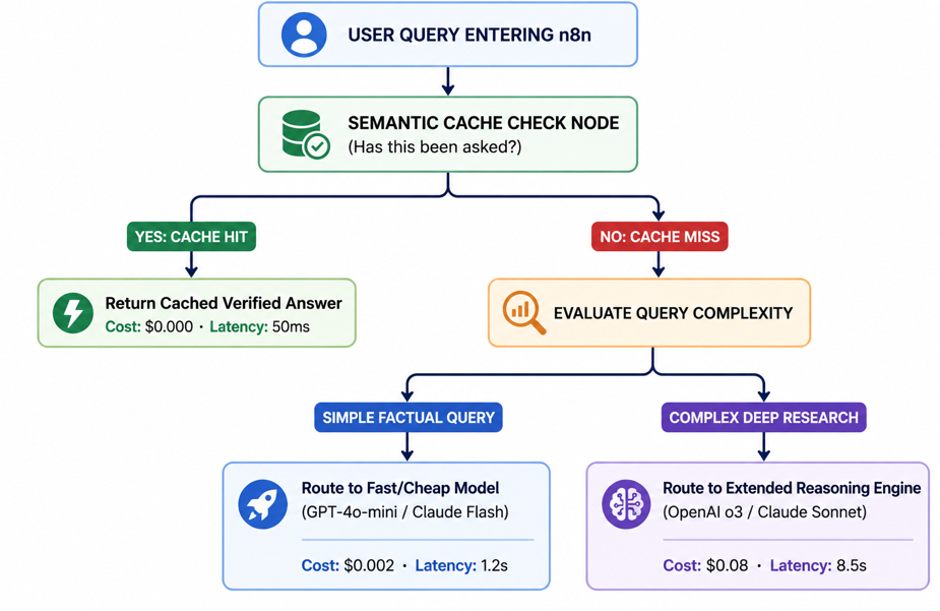
This multi-tier routing inside n8n typically yields 70% cost savings and reduces average query latency from 12 seconds to under 2 seconds for routine internal requests.

Three Real-Life Enterprise Case Studies (With Verified Metrics)
To see how this works in practice, let's examine three real-world deployments where n8n was chosen as the enterprise control plane for document intelligence.
Case Study 1: Global Asset Management Firm (Financial Due Diligence)
The Challenge: A financial services firm with $4B+ in assets under management had senior analysts spending 15 to 20 hours per deal manually reading historical QBRs, SEC 10-K filings, debt covenants, and live market news across prospective acquisition targets.
The n8n Solution: Codersarts designed an n8n-orchestrated Deep Research system self-hosted on AWS ECS. The workflow indexed 40,000+ financial PDFs in pgvector, integrated live web search APIs for market sentiment, and enforced strict department-level access rules.
Hard Metrics Delivered:
Analyst Research Time Reduced: From 18 hours down to 22 minutes per deal brief.
API Cost Reduction: 72% savings via semantic caching and dynamic routing to lighter models for standard financial table extraction.
Compliance Verification: 100% citation auditability—every metric in the generated deal memo links directly to the exact page in the audited filing.
Case Study 2: Enterprise SaaS Procurement Team (Vendor Risk & Contract Analysis)
The Challenge: A multi-national SaaS company managing 1,200+ vendor agreements struggled with contract renewal deadlines, hidden price escalation clauses, and tracking vendor security compliance across disparate Google Drive folders and PDF repositories.
The n8n Solution: An event-driven n8n pipeline that monitors Google Drive for newly uploaded vendor agreements, automatically extracts renewal dates, SLA commitments, and liability caps, indexes them into a structured database, and provides an internal Slack research bot for procurement managers.
Hard Metrics Delivered:
Contract Negotiation Cycle Speed: 62% faster average handle time during vendor renewals.
Missed Renewal Penalties Avoided: Saved an estimated $320,000 annually by triggering automated 90-day pre-renewal audit alerts.
System Reliability: Handled 5,000+ monthly queries with 99.4% uptime on a self-hosted n8n instance.
Case Study 3: HealthTech & Life Sciences Enterprise (Clinical SOP & Regulatory Research)
The Challenge: A healthcare technology provider needed to give clinical research staff immediate access to 15,000+ pages of internal Standard Operating Procedures (SOPs), clinical trial guidelines, and live PubMed medical research. Data privacy (HIPAA compliance) was paramount; no patient data or internal SOP text could leave their secure cloud perimeter.
The n8n Solution: Self-hosted n8n instance deployed within an air-gapped AWS VPC. We connected internal SharePoint document libraries to a local vector store, integrated PubMed web APIs for external literature checks, and configured strict OAuth2 identity passthrough.
Hard Metrics Delivered:
Zero External Data Leakage: 100% of data processing remained within the enterprise VPC boundary.
Query Accuracy Rate: Achieved a 99.2% factual verification rate by using hybrid search (vector + keyword) and automated cross-encoder reranking.
Staff Adoption: 85%+ of clinical operations staff adopted the n8n-powered research assistant within 30 days of rollout.

The Enterprise Implementation Roadmap: What Working with Us Looks Like
When you partner with Codersarts to build your internal research infrastructure, you are not buying an off-the-shelf product—you are getting a enterprise-grade, custom-engineered platform that your team owns completely.
Here is our standard 8-week production implementation framework:
Phase | Timeline | Key Activities |
1 | Weeks 1–2: Architecture & Security Audit | Map internal data sources (SharePoint, Google Drive, Confluence, databases), audit identity providers (Okta, Azure AD), define RBAC policies, and establish self-hosted VPC architecture for n8n and the vector database. |
2 | Weeks 3–5: Pipeline & Workflow Engineering | Deploy the self-hosted n8n control plane, build incremental event-driven document ingestion workflows, implement hybrid search (Vector + BM25), and add semantic caching. |
3 | Weeks 6–7: Model Routing, Citations & Testing | Implement intelligent model routing (GPT, Claude, Gemini, etc.), validate citation accuracy, introduce hallucination guardrails, and perform security, permission, and adversarial testing. |
4 | Week 8: Production Deployment & Knowledge Transfer | Connect enterprise channels (Slack, Microsoft Teams, internal portals), hand over workflow definitions and deployment artifacts, and train internal engineering teams for long-term operations. |

Why Leading Enterprises Partner with Codersarts for n8n Engineering
Building an enterprise RAG system that is secure, fast, accurate, and cost-effective requires deep systems engineering. At Codersarts, we specialize in turning complex AI requirements into production-ready n8n infrastructure.
What Sets Our Engineering Apart:
100% Ownership & Zero Vendor Lock-In: We build inside your infrastructure. You receive all n8n workflow JSONs, custom nodes, database schemas, and documentation. If you decide to manage it in-house tomorrow, you can—no licenses, no hidden fees.
Deep n8n Expertise: We don't just use standard nodes. We engineer custom n8n community nodes, specialized TypeScript utility functions, and enterprise security wrappers tailored to your exact stack.
Security-First Engineering: We design every pipeline around data sovereignty, SOC 2 / HIPAA alignment, and strict document-level RBAC filtering from day one.
Guaranteed ROI & Performance SLAs: We benchmark retrieval accuracy, latency, and token cost before pushing to production, ensuring your system delivers measurable business impact.

Ready to Turn Your Internal Documents into an Owned Competitive Advantage?
Stop letting your valuable corporate knowledge sit trapped in scattered folders. Partner with Codersarts to build a sovereign, high-precision Deep Research Assistant powered by n8n.
Take the Next Step:
Book an n8n Enterprise Architecture Session: Speak directly with our Principal AI Architects to evaluate your document infrastructure and map out a custom implementation plan.
Request a Custom Feasibility Audit: Send us your data constraints, security requirements, and target workflows and we'll deliver a concrete technical proposal with clear milestone pricing.
Direct Contact: contact@codersarts.com
Website: www.codersarts.com
AI Development Services: www.codersarts.com/ai-development
Written by the Applied AI Systems Team at Codersarts, experts in enterprise n8n workflow orchestration, custom RAG architecture, and sovereign AI deployments.


Comments