

How to Build a Containerized AI API with CI/CD on Azure
A working AI endpoint becomes much easier to release when every change follows a traceable path: test the source, build one container, store it under an immutable version, deploy a new platform revision, verify the live API, and preserve logs that connect the request to the release.
In this tutorial, we take a small FastAPI service named document-insight-api, package it with Docker, connect its GitHub repository to Azure DevOps Pipelines, push Git-commit-tagged images to Azure Container Registry, and deploy the image to Azure Container Apps. The pipeline waits for the new revision to become healthy and then verifies its health, version, and synthetic AI response.
The application performs deterministic text summarization and does not call a paid model. This isolates CI/CD behavior from model credentials, token cost, rate limits, latency, and nondeterministic output. A production implementation can replace the synthetic processor with Azure OpenAI, Azure AI Foundry, a self-hosted model, or another approved service while keeping the same container and release boundaries.
What You Will Build
The completed staging delivery path is:
Reviewed GitHub commit
        ↓
Azure Pipeline: test and validate
        ↓
Docker image tagged with the full Git SHA
        ↓
Private Azure Container Registry
        ↓ managed-identity image pull
Azure Container Apps revision
        ↓
Health, version, revision, and inference checks
        ↓
Azure Monitor Log Analytics + Application Insights
The implementation demonstrates:
A deterministic FastAPI AI-style request and response contract.
A multi-stage container that runs as non-root UID 10001.
GitHub pull-request validation and an Azure Pipeline triggered from main.
Test-before-build ordering.
Separate Docker@2 build and push tasks so the source SHA can be embedded in the image.
An ACR image tagged with Build.SourceVersion, not latest.
A user-assigned managed identity with AcrPull for the Container App.
A new Container Apps revision with an Azure Pipeline build identifier
Post-deployment verification of platform health and application identity.
Structured stdout logs in Log Analytics and supported FastAPI telemetry in Application Insights.
Why This Matters in Production
Manual builds and portal deployments create ambiguity. A responding API does not prove which source produced it, whether tests passed, whether someone moved a mutable image tag, or whether a failed revision was detected before users reached it.
AI applications add configuration that can change behavior without a large code diff: prompt templates, retrieval logic, model IDs, safety settings, tools, evaluation thresholds, and provider endpoints. A release record should connect those changes to the container image, test evidence, platform revision, and live verification.
This tutorial demonstrates that technical spine. It does not claim that one public staging endpoint is a complete production AI platform. Authentication, private networking, policy enforcement, model evaluations, progressive traffic, data governance, incident management, and formal approvals remain workload and organizational decisions.
Target Architecture

Azure Pipelines supports a Docker@2 task for building and pushing images to a registry. Microsoft-hosted Ubuntu agents include Docker, and the task can attach pipeline and base-image metadata. See Build and push container images with Azure Pipelines.
An image change is revision-scoped in Azure Container Apps, so deployment creates a new immutable revision. Container Apps can use a managed identity to pull from private ACR without registry administrator credentials. See Azure Container Apps revisions and ACR image pull with managed identity.
What We Reused from the Existing Projects
The application layer is adapted from the cloud-neutral document-insight-api already used in the Docker, EKS, and GCP projects. Reuse is appropriate because the API contract has not changed:
/summarize returns a predictable first-30-word result.
/healthz and /readyz expose liveness and readiness.
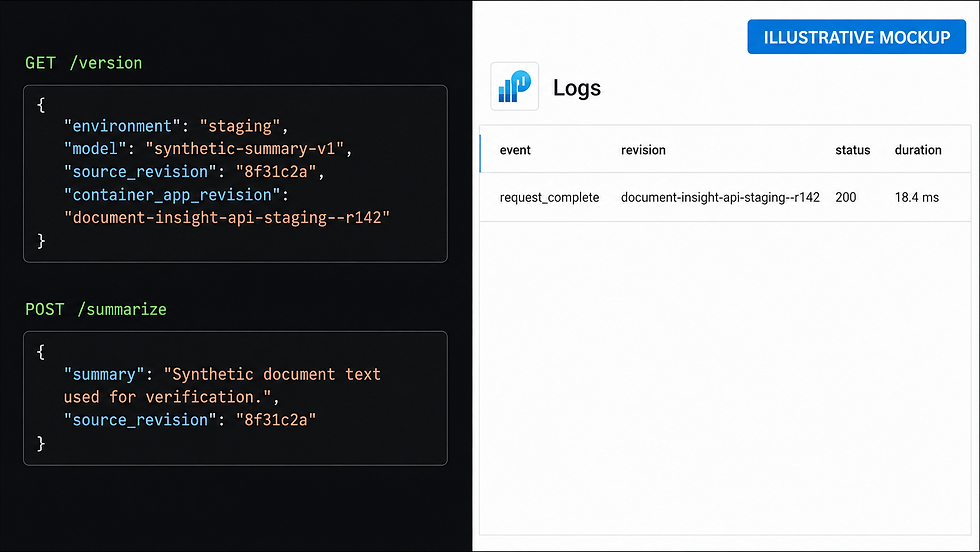
/version exposes release evidence.
Pydantic rejects empty or oversized input.
Structured logging excludes request and response bodies.
The image uses two stages, port 8080, a health check, and non-root UID 10001.
The Azure version changes only provider-specific behavior. /version now reports CONTAINER_APP_REVISION, and the logging records the same revision. The application calls configure_azure_monitor() only when an Application Insights connection string exists. Azure-specific pipeline, ACR, Container Apps, Bicep, identity, and Kusto files replace the AWS and GCP equivalents.
Prerequisites
Prepare the following before changing Azure resources:
An Azure subscription and an isolated sandbox resource group.
An Azure DevOps organization/project and a GitHub repository.
Permission to register providers and create ACR, managed identity, role assignment, Log Analytics, Application Insights, and Container Apps resources.
Permission to create and authorize Azure DevOps service connections and secret variables.
Azure CLI, the Container Apps extension, and Bicep.
Docker Desktop or Docker Engine, Git, PowerShell 7, and Python 3.13.
A globally unique lowercase alphanumeric ACR name.
An agreed region. The example uses eastus2.
Owners for pipeline permissions, registry retention, monitoring, cost, incident response, and cleanup.
Use short-lived interactive credentials or approved workload identity federation. Never commit subscription credentials, service-principal secrets, ACR passwords, Application Insights connection strings, model credentials, private endpoints, prompts, or customer data.
Step 1: Test the Reused FastAPI Service Locally
Start by proving the API independently of Azure:
cd .\examples\azure-containerized-ai-api-cicd
python -m venv .venv
.\.venv\Scripts\Activate.ps1
python -m pip install --upgrade pip
python -m pip install -r requirements-dev.txt
python -m pytest -q
python .\scripts\check_pipeline.py
The application tests cover health, readiness, request-ID propagation, deterministic summarization, rejected empty input, Container Apps revision metadata, and the no-telemetry local path. The release validator checks the stage order, Docker build and push separation, Git SHA tag, managed ACR pull identity, Container Apps revision suffix, secret reference, post-deployment verification, Bicep security defaults, Log Analytics, and Application Insights resources.
During this authoring pass, all five application tests passed. The offline pipeline/Bicep control validator, Python syntax check, PowerShell parser, and project-wide repository validator also passed. Azure CLI was not installed, so the Bicep template could not be compiled or deployed locally; these offline results do not prove an Azure resource deployment.
The Azure Monitor OpenTelemetry distribution is initialized only when APPLICATIONINSIGHTS_CONNECTION_STRING is present. Local development remains usable without exporting telemetry.
Build and test the image when Docker is available:
docker build `
  --build-arg BUILD_REVISION=azure-local-smoke `
  --tag document-insight-api:azure-local `
  .

.\scripts\local-smoke.ps1 -Image document-insight-api:azure-local
The smoke script uses a read-only filesystem, a temporary /tmp, dropped Linux capabilities, and no-new-privileges. It waits for the image health check, calls the API, and removes the temporary container.
Step 2: Deploy ACR, Monitoring, and the Container Apps Environment
Choose explicit names:
$SubscriptionId = '<AZURE_SUBSCRIPTION_ID>'
$ResourceGroup = 'rg-document-insight-staging'
$Location = 'eastus2'
$AcrName = '<GLOBALLY_UNIQUE_LOWERCASE_ACR_NAME>'

az login
Review infrastructure/main.bicep and scripts/bootstrap-azure.ps1, then deploy the foundation:
.\scripts\bootstrap-azure.ps1 `
  -SubscriptionId $SubscriptionId `
  -ResourceGroup $ResourceGroup `
  -AcrName $AcrName `
  -Location $Location
The Bicep template creates:
Resource | Example name | Purpose |
Azure Container Registry | Your unique name | Stores commit-tagged Docker images |
User-assigned managed identity | id-document-insight-acr-pull | Pulls private images with AcrPull |
Log Analytics workspace | log-document-insight-staging | Stores Container Apps console/system logs |
Application Insights | appi-document-insight-staging | Stores supported application telemetry |
Container Apps environment | cae-document-insight-staging | Hosts revisions and connects platform logs |
The ACR administrator account and anonymous pull are disabled. The pull identity receives AcrPull on only this registry. The Basic tier and public registry network access make the tutorial accessible; they are not automatic production recommendations.
The Container App itself is not created yet. Its private image does not exist until the pipeline passes tests and pushes the first commit.
Step 3: Configure Azure DevOps Connections and the Telemetry Secret
The pipeline separates registry and resource deployment access.
First create a Docker Registry service connection for the ACR instance under Azure DevOps > Project settings > Service connections. Name it, for example:
sc-document-insight-acr
Authorize it only for this pipeline where practical. Give its identity the ACR data-plane permission required to push images; do not enable the registry administrator account just to make the pipeline work.
Next create an Azure Resource Manager connection scoped to rg-document-insight-staging, for example:
sc-document-insight-staging
Prefer workload identity federation where supported. The identity needs permission to read the pull identity and create or update the Container App. It does not need subscription-wide Owner access.
Retrieve the Application Insights connection string in an approved administrator session:
az monitor app-insights component show `
  --app 'appi-document-insight-staging' `
  --resource-group $ResourceGroup `
  --query connectionString `
  --output tsv
Create an Azure Pipeline variable named APPLICATIONINSIGHTS_CONNECTION_STRING, mark Keep this value secret, and authorize it only for the intended pipeline. The deployment stores it as a Container App secret and references it as an environment variable. Microsoft recommends using an environment variable for production OpenTelemetry configuration rather than hardcoding the connection string. See Enable OpenTelemetry in Application Insights.
Step 4: Configure the Azure Pipeline for GitHub
Replace the template values in azure-pipelines.yml:
variables:
  dockerRegistryServiceConnection: sc-document-insight-acr
  azureSubscriptionServiceConnection: sc-document-insight-staging
  resourceGroup: rg-document-insight-staging
  acrName: <YOUR_ACR_NAME>
  acrLoginServer: <YOUR_ACR_NAME>.azurecr.io
  imageRepository: document-insight-api
  containerAppsEnvironment: cae-document-insight-staging
  containerAppName: document-insight-api-staging
  pullIdentityName: id-document-insight-acr-pull
  appEnvironment: staging
In Azure DevOps:
Open Pipelines and create a new pipeline.
Select GitHub as the code location.
Authorize the Azure Pipelines GitHub App only for the required repository where possible.
Choose Existing Azure Pipelines YAML file and /azure-pipelines.yml.
Authorize the two service connections and the secret variable or variable group.
Protect main in GitHub with review and required tests.
The repository includes a small GitHub Actions workflow for pull-request tests. Only Azure Pipelines publishes the image and changes the Azure service.

Step 5: Build and Push a Git-Versioned Image to ACR
The project uses separate Docker build and push tasks:
- task: Docker@2
  inputs:
    command: build
    containerRegistry: $(dockerRegistryServiceConnection)
    repository: $(imageRepository)
    tags: |
      $(Build.SourceVersion)
    arguments: --build-arg BUILD_REVISION=$(Build.SourceVersion)

- task: Docker@2
  inputs:
    command: push
    containerRegistry: $(dockerRegistryServiceConnection)
    repository: $(imageRepository)
    tags: |
      $(Build.SourceVersion)
The separation is deliberate. Microsoft documents that the arguments input is ignored by the buildAndPush convenience command. Splitting the operations allows the full Git SHA to become both the ACR tag and the image's SOURCE_REVISION metadata. See the Docker@2 task reference.
The resulting image is:
<acr-name>.azurecr.io/document-insight-api:<full-git-sha>
The pipeline never deploys latest. For stronger immutability, retain the ACR manifest digest in release evidence and evaluate policies that prevent a tag from being overwritten.

Step 6: Deploy the Image as a Container Apps Revision
The Deploy stage uses the Azure Resource Manager service connection and Azure CLI. On the first run it creates document-insight-api-staging; later runs update its image.
The important deployment controls are:
Image:              <acr>.azurecr.io/document-insight-api:<Git SHA>
Revision suffix:    r<Azure Pipeline Build ID>
Registry identity:  id-document-insight-acr-pull
Ingress:            external HTTPS
Target port:        8080
Environment:        APP_ENV=staging
Telemetry:          secretref:appinsights-connection-string
CPU / memory:       0.5 / 1.0 GiB
Replicas:           0 minimum / 3 maximum
An image update is revision-scoped and produces a new Container Apps revision. Azure Container Apps also automatically provides CONTAINER_APP_REVISION, which the API returns through /version. See built-in Container Apps environment variables.
The Container App authenticates to ACR through the user-assigned identity. The application process does not need an ACR password, and the registry administrator account remains disabled.
External ingress is used to make the tutorial verification simple. A production API should add Container Apps authentication, Azure API Management, private ingress, network restrictions, rate limiting, and explicit caller authorization as required.

Step 7: Verify the Live Revision in the Pipeline
The Verify stage reads the latest revision name and waits for properties.healthState to become Healthy. It then reads the Container App FQDN and runs:
python scripts/smoke_test.py \
  --url "https://$FQDN" \
  --expected-environment staging \
  --expected-revision "$(Build.SourceVersion)" \
  --expected-container-app-revision "$REVISION_NAME"
The smoke test checks:
/healthz returns an alive response.
/version reports staging.
/version reports the exact Git SHA used by the build.
/version reports the exact Container Apps revision selected by Azure.
/summarize returns a successful synthetic response with the same source revision.
You can repeat the verification manually:
$Revision = az containerapp show `
  --name document-insight-api-staging `
  --resource-group $ResourceGroup `
  --query properties.latestRevisionName `
  --output tsv

$Fqdn = az containerapp show `
  --name document-insight-api-staging `
  --resource-group $ResourceGroup `
  --query properties.configuration.ingress.fqdn `
  --output tsv

$CommitSha = git rev-parse HEAD
python .\scripts\smoke_test.py `
  --url "https://$Fqdn" `
  --expected-environment staging `
  --expected-revision $CommitSha `
  --expected-container-app-revision $Revision
This proves the release contract and identity. It does not prove model quality, security, capacity, data governance, or resilience.
Step 8: Inspect Logs and Application Insights
Container Apps supplies console, system, and HTTP log paths. With Log Analytics selected for the environment, stdout/stderr events are queryable in ContainerAppConsoleLogs_CL, and platform revision events appear in ContainerAppSystemLogs_CL.
Open Container App > Monitoring > Logs and use the included query:
ContainerAppConsoleLogs_CL
| where ContainerAppName_s == "document-insight-api-staging"
| where Log_s has "request_complete"
| project TimeGenerated, RevisionName_s, ContainerImage_s, Log_s
| order by TimeGenerated desc
Azure Monitor ingestion can take several minutes. Use the live log stream for immediate startup or image-pull diagnostics. Microsoft documents the tables and delay in Monitor Container Apps logs with Log Analytics.
The application uses azure-monitor-opentelemetry==1.8.9, the current release verified for this draft. When the connection string is set, the distribution provides supported FastAPI instrumentation. In Application Insights, query:
requests
| where cloud_RoleName == "document-insight-api"
| project timestamp, name, resultCode, success, duration, operation_Id, cloud_RoleInstance
| order by timestamp desc
Verify the Implementation
Use this evidence matrix before publication:
Control | Test | Expected evidence |
Test-before-publish | Introduce a failing unit test on a temporary branch | Pipeline stops before Docker build/push |
Source traceability | Compare Git, pipeline, ACR, and /version | Full SHA agrees across all four locations |
Private registry access | Inspect registry and Container App identity | ACR admin disabled; user-assigned identity has AcrPull |
Revision creation | Merge a controlled change | New r<Build ID> revision references the new SHA tag |
Health gate | Deploy a deliberately broken sandbox image | Verify stage fails and records unhealthy provisioning evidence |
API contract | Run smoke_test.py | Health, version, revision, and synthetic response pass |
Console observability | Query Log Analytics | Structured request_complete event maps to the revision |
Request telemetry | Query Application Insights | FastAPI request trace appears without prompt content |
Run failure tests only in an isolated sandbox. A red pipeline is useful evidence when it proves that an unsafe artifact did not proceed.
Production Considerations
Identity and Pipeline Security
Keep the ACR push identity separate from the Container Apps pull identity. Scope the Azure Resource Manager service connection to the intended resource group. Restrict service connections and variable groups to the pipeline that needs them, and protect changes to azure-pipelines.yml, Dockerfile, dependencies, Bicep, tests, and evaluation policy with review.
Prefer workload identity federation for Azure Resource Manager connections where available. Avoid long-lived service-principal secrets and ACR administrator credentials. Use Azure RBAC conditions or custom roles when predefined roles exceed the required scope.
Registry and Supply-Chain Controls
Commit tags make releases recognizable, but a digest is the immutable content identity. Retain the digest with the pipeline run and revision. Add vulnerability assessment, dependency scanning, SBOM generation, signing, provenance, admission or deployment policy, controlled base-image updates, and ACR retention rules.
Never allow an untrusted pull request to use production service connections or secret variables.
API Exposure and Data Protection
The tutorial uses public HTTPS ingress without application authentication. Put real APIs behind approved caller authentication, API Management or an equivalent gateway, request limits, network policy, and threat protection. Evaluate private endpoints for ACR, internal Container Apps environments, controlled egress, customer-managed keys, and regional requirements.
Do not log prompts, documents, generated output, tokens, model keys, or user identifiers by default. Classify telemetry before choosing retention and export destinations.
AI-Specific Release Evidence
Record the model ID, prompt template, retrieval dataset or index version, tool permissions, content filters, evaluation suite, thresholds, and exception approvals associated with the container release. A passing HTTP smoke test does not establish answer quality or safe agent behavior.
Add evaluation gates for grounding, hallucination, prompt injection, refusal behavior, privacy, tool authorization, latency, throughput, and cost.
Reliability, Scaling, and Rollback
The tutorial uses zero minimum replicas and a maximum of three. Measure cold-start tolerance, real inference latency, memory, CPU, concurrency, provider quota, and downstream timeouts before choosing production limits.
Azure Container Apps supports single and multiple revision modes. Multiple revision mode can support traffic splitting and labels; single revision mode moves traffic to the latest healthy revision. Define rollback ownership and rehearse restoring a known-good digest. Avoid relying on a mutable tag during incident recovery.
Monitoring and Auditability
Create alerts for unhealthy revisions, replica failures, image-pull errors, elevated HTTP failures, latency, dependency failure, and capacity. Set Log Analytics and Application Insights sampling, retention, access, diagnostic settings, archive, and export based on policy.
Retain the Git review, test results, Azure Pipeline run, ACR digest, Container Apps revision, deployment actor, smoke-test output, and telemetry evidence as one release record.
Clean Up the Tutorial Resources
Identify the exact resources before deleting anything:
az resource list --resource-group $ResourceGroup --output table
If and only if the resource group is dedicated to this tutorial, remove it after retaining required evidence:
az group delete --name $ResourceGroup
Deleting a resource group permanently removes all contained ACR images, Container Apps revisions, Log Analytics data, Application Insights data, identities, and role assignments. Do not run it against a shared resource group.
Separately remove the Azure Pipeline, ACR and Azure Resource Manager service connections, secret variables or variable groups, GitHub App authorization, pipeline artifacts, and any role assignments created outside the resource group.
Reference Implementation
The GitHub-ready companion project is examples/azure-containerized-ai-api-cicd. It includes:
The reused FastAPI application and five tests.
Azure Container Apps revision metadata and JSON logging.
Optional Application Insights initialization using Azure Monitor OpenTelemetry.
A non-root, multi-stage Dockerfile.
GitHub pull-request CI.
Azure Pipeline Test, BuildAndPush, Deploy, and Verify stages.
Bicep for ACR, identity, Log Analytics, Application Insights, and the Container Apps environment.
A managed-identity AcrPull assignment.
Bootstrap, local smoke, cloud smoke, and pipeline-control scripts.
Log Analytics and Application Insights Kusto queries.
A detailed README with deployment, verification, limitations, cleanup, and CodersArts links.
No subscription ID, tenant ID, service-principal secret, registry password, connection string, token, customer data, or real model credential is stored in the project.
How Codersarts Can Help
CodersArts can help teams turn a working AI service into an Azure delivery platform: Docker hardening, Azure Pipelines automation, ACR governance, Container Apps deployment, managed identity, Application Insights instrumentation, Log Analytics, release verification, model evaluation gates, private networking, and operational runbooks.
Explore another open-source implementation: CodersArts Identity Verification API.
Contact: Email: contact@codersarts.com
Conclusion
This implementation connects a reviewed Git commit to a tested Docker image, a private ACR record, a Container Apps revision, a live API result, and Azure observability evidence. That end-to-end connection is the foundation of a release process teams can inspect and improve.
The next production step is not simply adding a real model call. It is attaching model and data evaluations, caller authorization, supply-chain policy, controlled environment promotion, alerts, rollback ownership, and cost governance to the same release identity.


Comments