

How to Add Docker Image Build and Validation to an AWS CI/CD Pipeline
.jfif/v1/fill/w_320,h_320/file.jpg)

The Illusion of Container Safety
In the early stages of adopting containerization, teams often celebrate what feels like total victory. They have successfully written a Dockerfile, bundled their application runtime, verified that it runs locally, and even pushed an image manually to Amazon Elastic Container Registry (ECR). The painful "it works on my machine" problem appears solved.
Yet in enterprise environments, this manual workflow introduces a far more dangerous vulnerability: the illusion of consistency.
When engineers build and push container images directly from their laptops or ad-hoc virtual machines, several systemic failure modes quietly enter the software lifecycle:
1. Unverifiable Provenance: There is no cryptographic or auditable guarantee of what code, libraries, or local file edits actually went into the image. A developer might have a dirty git working tree, untracked local dependencies, or experimental binaries baked into an artifact that ends up serving production traffic.
2. Bypassed Security Scans: A manually pushed image bypasses vulnerability scanning, static Dockerfile linting, software bill of materials (SBOM) generation, and compliance checks.
3. Credential Sprawl: Giving individual developers long-lived IAM permissions or Docker login access to push directly to production container registries violates the principle of least privilege and dramatically widens the attack surface.
4. Untested Runtime Assumptions: Even if an image builds successfully, whether it can start cleanly without host-specific environment variables, pass a readiness probe, and serve traffic under simulated network conditions remains unverified until it hits production.
The remedy is not simply "writing a script to push to AWS." The solution is to treat your container build and validation process as a first-class continuous integration and continuous delivery (CI/CD) quality gate.
In this guide, we will explore how to design, architect, and implement an automated Docker image build and validation pipeline on AWS. We will examine how to orchestrate automated builds using AWS CodePipeline and AWS CodeBuild (or modern Git-integrated runners), enforce strict validation gates—including static linting, vulnerability scanning, and ephemeral container smoke tests—before publishing to Amazon ECR, and seamlessly hand off validated artifacts to Amazon ECS or EKS.
The Architecture of a Modern Container CI/CD Pipeline
Before diving into individual phases, let us establish the overarching architectural blueprint. A robust container pipeline does not merely compile code; it functions as an automated assembly line that subjects the artifact to escalating levels of verification before granting admission to production registries.
Step | Pipeline Stage | Primary Tools / Services | Key Activities & Details |
1 | Source Stage | GitHub / AWS CodeCommit | Source code repository and pipeline trigger |
2 | Build Stage | AWS CodeBuild, Hadolint | Static Dockerfile linting, layer-optimized multi-stage builds, unit & dependency testing |
3 | Validation Stage | Trivy / Amazon Inspector | Container vulnerability scanning, ephemeral runtime smoke testing, health & readiness endpoint verification |
4 | Publish Stage | Amazon ECR | Immutability tagging (Git SHA + SemVer), image push with enhanced scanning, deployment manifest (imagedefinitions.json) generation |
5 | Deployment Stage | Amazon ECS / EKS / Fargate | Final application deployment and runtime execution |
The Six Mandatory Pipeline Gates
A production-ready AWS container pipeline enforces six distinct gates:
1. Source Integrity Gate: Triggered strictly on authenticated git events (Pull Request merge, tagged release) with verified commit signatures.
2. Static Construction Gate: Analysis of the Dockerfile syntax, base image provenance, and adherence to security best practices (e.g., forbidding root execution, pinning base digests).
3. Build & Compilation Gate: Execution of multi-stage container builds leveraging distributed layer caches to ensure reproducible compilation without build-tool leakage.
4. Vulnerability & Compliance Gate: Comprehensive scanning of the OS packages, language dependencies, and binary libraries within the built image against known Common Vulnerabilities and Exposures (CVE) databases.
5. Runtime Validation & Smoke Gate: Spinning up the freshly built container in an isolated, ephemeral sandbox within the CI runner, injecting mock environment variables, and validating health/readiness endpoints before any registry push occurs.
6. Immutable Publishing Gate: Tagging the container with deterministic metadata (Git commit SHA, release version) and publishing to an Amazon ECR repository configured with image tag immutability and KMS encryption.

Step 1: The Automated Build Environment & Engine
When transitioning from local builds to an automated CI environment such as AWS CodeBuild, the first hurdle is understanding the execution environment.
Docker-in-Docker and Privileged Execution
Building a Docker image inside an automated CI runner requires the runner itself to have access to a Docker daemon. In AWS CodeBuild, this is enabled by selecting an environment configured with `privilegedMode: true`.
In a standard virtualized container runner, nested container execution is restricted for security reasons. Enabling privileged mode grants the CodeBuild execution container the Linux capabilities required to start the Docker daemon, mount container filesystems, and run nested build tasks.
Level / Context | Component Name | Parent / Trigger | Role / Details |
Host Environment | AWS CodeBuild Execution Runner | — | Overall execution environment |
Runtime Service | Docker Daemon (dockerd) | AWS CodeBuild Execution Runner | Core container runtime manager |
Build Engine | BuildKit Engine | Docker Daemon | Multi-Stage Execution |
Test Environment | Ephemeral Test Container | Docker Daemon | Short-lived test runtime container |
Turbocharging CI Builds: BuildKit and Layer Caching
One of the primary complaints engineering teams raise against automated container pipelines is build duration. While an engineer's laptop retains cached layers locally across builds, an ephemeral CI runner spins up fresh every time. If a pipeline must download 4 GB of base dependencies and reinstall hundreds of packages on every commit, pipeline durations will quickly exceed 15–20 minutes, killing developer velocity.
To achieve local-speed builds in an ephemeral cloud runner, AWS CodeBuild must be configured with Docker BuildKit and Remote Cache Backends:
- Docker BuildKit (`DOCKER_BUILDKIT=1`): Enables parallel stage evaluation, skips unneeded build stages, and provides advanced caching mechanisms.
- Amazon ECR Cache Backend (`--cache-from` / `--cache-to`): Allows Docker to pull cached layers directly from an existing Amazon ECR repository or dedicated cache manifest, eliminating redundant work for unchanged layers.
- CodeBuild Local Caching: Enables caching of Docker layer blocks and custom directory caches (such as package manager caches) on AWS-managed SSDs attached to the build project.
By implementing remote layer caching, production pipeline build times routinely drop by 70% to 90%, transforming a 15-minute bottleneck into a 90-second checkpoint.
Step 2: The Build Specification Contract (`buildspec.yml`)
In the AWS ecosystem, AWS CodeBuild is directed by a YAML configuration file known as the `buildspec.yml`. This file defines the lifecycle phases, commands, environment variables, and output artifacts of the build process.
Rather than treating the buildspec as a simple list of shell commands, enterprise architectures structure it into four distinct, audited phases:
1. `install` Phase: Tooling & Linters
Prepares the build environment by installing linters (e.g., Hadolint), vulnerability scanners (e.g., Trivy or AWS Inspector CLI), and any testing utilities required during validation.
2. `pre_build` Phase: Authentication & Static Linting
- Authenticates the Docker client with Amazon ECR using AWS IAM temporary credentials (`aws ecr get-login-password`).
- Executes static analysis on the Dockerfile. If the Dockerfile contains security violations (e.g., hardcoded secrets, untagged base images, usage of root user), the pipeline fails immediately before spending compute time on a build.
- Determines the immutable tag metadata based on Git commit hashes (`CODEBUILD_RESOLVED_SOURCE_VERSION`) and build timestamps.
3. `build` Phase: Compilation & Image Construction
- Executes `docker build` with BuildKit enabled, pointing to remote ECR cache targets.
- Passes build-time arguments (such as application release metadata) while strictly avoiding secret injection.
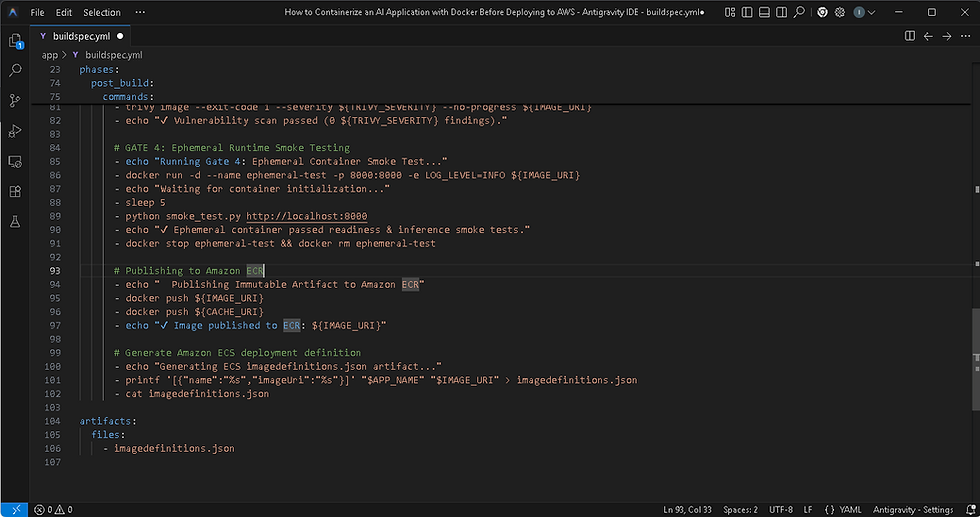
4. `post_build` Phase: Deep Validation, Scanning & Push
- Runs vulnerability scans against the built image.
- Launches an ephemeral instance of the container locally on the runner, executes automated synthetic smoke tests against exposed endpoints, and checks exit codes.
- Upon passing all gates, pushes the tagged image and cache layers to Amazon ECR.
- Generates the deployment artifact (`imagedefinitions.json`) required by downstream ECS/EKS deployment stages.

Step 3: Multi-Layered Validation Gates in Action
The cornerstone of a true CI/CD container pipeline is its ability to reject defective or non-compliant artifacts automatically. Let us break down the four critical validation layers that execute within the pipeline.
Gate | Validation Stage | Tool(s) | Validation Focus |
Gate 1 | Static Dockerfile Linting | Hadolint | Syntax, unpinned base images, root user execution, non-deterministic package adds |
Gate 2 | Build-Time Unit & Integrity Tests | PyTest / Jest (inside intermediate container stages) | Code correctness, import resolution, dependency integrity |
Gate 3 | Container Vulnerability Scanning (CVE Audit) | Amazon Inspector / Trivy / Clair | Known CVEs in OS packages, Python/Node dependencies, base image vulnerabilities |
Gate 4 | Ephemeral Runtime Smoke Testing | Docker run + synthetic HTTP probes / health verification script | Startup time, environment variable consumption, readiness & liveness endpoints |
Gate 1: Static Dockerfile Linting (Hadolint)
Before a single container layer is built, the pipeline runs static analysis against the Dockerfile. A tool like Hadolint parses the Dockerfile AST (Abstract Syntax Tree) and checks it against established best practices and security rules.
Common violations caught at this stage include:
- DL3002: `USER root` specified without dropping privileges before execution.
- DL3006: Base image tag omitted or using `:latest` instead of an immutable digest or explicit version.
- DL3008: Package manager commands (e.g., `apt-get install`) without pinned package versions.
- DL3020: Using `ADD` instead of `COPY` for local files, which introduces security risks with archive extraction.
If any rule flagged with a severity threshold of `ERROR` or `WARNING` triggers, the pipeline aborts immediately, providing clear feedback in the build log.
Gate 2: Build-Time Unit & Integrity Verification
By utilizing multi-stage Docker builds, unit tests and test suites run within an isolated build stage. If any test fails, the build command exits with a non-zero status, and no final runtime image is ever produced.
Because multi-stage builds separate test dependencies (such as test runners, mock libraries, and linters) from the production stage, your production runtime container remains ultra-lean and devoid of test artifacts.
Gate 3: Container Vulnerability Scanning (CVE Audit)
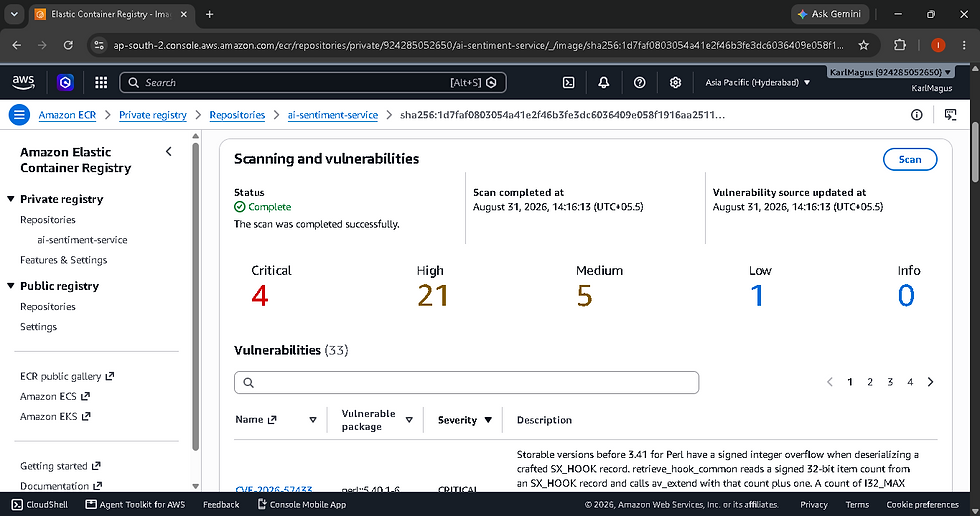
Once the image is constructed, the pipeline subjects the image to an automated vulnerability audit. This can be performed using tools like Aqua Trivy, Snyk, or native Amazon Inspector integration.
The scanner analyzes every operating system package and language dependency inside the image layers, comparing them against the National Vulnerability Database (NVD) and security advisories.
The pipeline can be configured with strict failure thresholds:
- Low / Medium CVEs: Logged as warnings for reporting and technical debt tracking.
- High / Critical CVEs: Trigger an immediate pipeline failure, blocking the image from being pushed to ECR.
This prevents zero-day vulnerabilities or unpatched upstream libraries from sneaking into your production cluster.

Gate 4: Ephemeral Runtime Smoke Testing
Static checks and vulnerability scans verify what is inside the image; smoke testing verifies how the image actually behaves when started.
Many container failures occur because of subtle runtime issues that cannot be detected statically:
- Missing runtime environment variables causing immediate crashes.
- Heavy model files or initialization routines exceeding memory limits.
- Permissions issues preventing a non-root user from writing to required temporary directories.
- Port binding mismatches between the application and the container runtime.
To catch these issues in CI, the `buildspec.yml` executes an ephemeral smoke test:
1. The build runner launches the newly built image in the background using `docker run -d` with realistic mock environment variables and port mapping.
2. A polling script waits for the container process to initialize (e.g., 5–15 seconds).
3. Automated synthetic HTTP requests (using `curl` or a dedicated test script) hit the container's `/health/live` and `/health/ready` endpoints.
4. The smoke test verifies that:
- The HTTP status code returns `200 OK`.
- The response payload contains expected service metadata.
- The container does not crash or emit error logs to stderr during startup.
5. The ephemeral container is stopped and cleaned up (`docker stop` and `docker rm`).
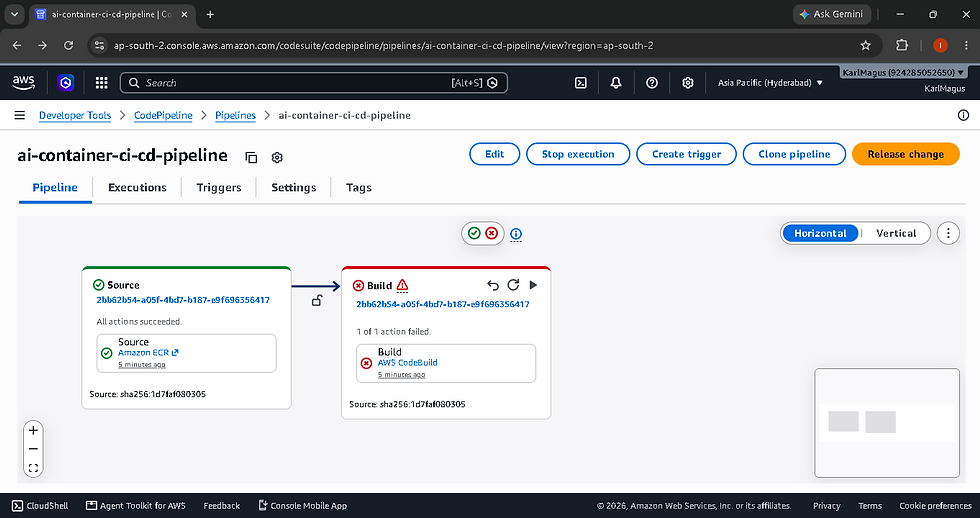
If the smoke test fails—or if the container exits prematurely—the build runner dumps the container's runtime logs into the CodeBuild console and halts the pipeline. The bad image is never pushed to ECR.

Step 4: Tagging, Immutability, and Publishing to Amazon ECR
Once all validation gates have cleared, the image is ready for publication to Amazon Elastic Container Registry (ECR). In enterprise environments, how you tag and store images in ECR is vital for security, rollback reliability, and operational auditability.
The Dangers of the `:latest` Tag
In a production CI/CD pipeline, relying on the `:latest` tag is an anti-pattern. If multiple developers or automated jobs push to `:latest`, it becomes impossible to determine which code version is running in an ECS cluster. Furthermore, rolling updates cannot be reliably triggered if the image URI string remains identical.
The Immutable Tagging Strategy
Every image published by the pipeline should receive at least two tags:
1. The Git Commit SHA Tag: (e.g., `ai-inference-service:a1b2c3d4`). This creates an unbreakable, auditable link between the container artifact and the exact commit in your version control system.
2. The Release / Semantic Version Tag: (e.g., `ai-inference-service:v1.4.2` or `ai-inference-service:build-108`). Used for release tracking and milestone tagging.
Enabling ECR Tag Immutability
Amazon ECR provides a native feature called Tag Immutability. When enabled on a repository, ECR prevents any image tag from being overwritten once pushed. If an attacker or a misconfigured pipeline attempts to push a different image with an existing tag (such as `v1.0.0`), ECR rejects the push with an error.
This guarantees that an artifact deployed to staging today cannot be silently altered before it is promoted to production next week.
Step 5: Automated Hand-off to Deployment (ECS / EKS)
Building and validating the container image is the first half of the CI/CD pipeline; the second half is updating the target runtime environment without causing downtime.
Generating the Deployment Manifest
For Amazon ECS deployments, AWS CodePipeline uses an artifact named `imagedefinitions.json`. This JSON document maps the container name defined in your ECS Task Definition to the newly pushed ECR image URI.
During the `post_build` phase of CodeBuild, this file is dynamically generated:
[

  {

    "name": "ai-sentiment-service",

    "imageUri": "123456789012.dkr.ecr.us-east-1.amazonaws.com/ai-sentiment-service:a1b2c3d4"

  }

]
Zero-Downtime Rolling Deployment in ECS
When AWS CodePipeline progresses from the Build stage to the Deploy stage, ECS executes a rolling update:
1. ECS reads the new image URI from `imagedefinitions.json`.
2. ECS creates a new revision of the Task Definition referencing the new image.
3. ECS launches new container tasks (instances) running the updated version.
4. ECS waits for the new tasks to pass Application Load Balancer (ALB) health checks.
5. Once new tasks are healthy and serving traffic, ECS gracefully stops the old container tasks.
6. If the new tasks fail their health checks, the ECS Deployment Circuit Breaker automatically halts the rollout and rolls back to the previous healthy task definition version without human intervention.
Enterprise Production Considerations
Deploying containerized AI or enterprise workloads through CI/CD requires addressing specialized security, governance, and operational requirements.
1. IAM Least Privilege for CI/CD Service Roles
The AWS CodeBuild service role should follow strict least-privilege boundaries:
- ECR Permissions: Restrict `ecr:PutImage`, `ecr:InitiateLayerUpload`, and `ecr:UploadLayerPart` to only the specific target repository ARN.
- KMS Permissions: Grant `kms:GenerateDataKey` and `kms:Decrypt` strictly for the repository's encryption key.
- No Direct ECS Deployment Access: CodeBuild should only output deployment artifacts; the deployment itself should be executed by CodePipeline's dedicated deployment agent.
2. Multi-Account AWS Architectures
Enterprise organizations rarely build and deploy within a single AWS account. The industry standard pattern separates environments across multiple accounts:
- Shared Services / Tooling Account: Hosts the AWS CodePipeline, CodeBuild projects, and central ECR repositories.
- Development Account: Hosts the Dev ECS/EKS clusters.
- Staging / QA Account: Hosts pre-production testing clusters.
- Production Account: Hosts isolated, high-availability production clusters.
In this topology, ECR repository policies grant cross-account `ecr:BatchGetImage` and `ecr:GetDownloadUrlForLayer` permissions to the staging and production accounts. CodePipeline uses cross-account IAM assume-role mechanisms to trigger deployments in target accounts only after automated integration tests pass in staging.
Configuration Feature | Status | Tool / Mechanism | Description & Impact |
Tag Immutability | ENABLED | — | Prevents accidental overwrites of existing tags |
Enhanced Vulnerability Scanning | ENABLED | Amazon Inspector | Continuous scanning of container layers against newly discovered CVEs |
KMS Encryption | ENABLED | AWS KMS Customer Managed Key | Enforces encryption at rest for all stored image layers |
Lifecycle Policies | ENABLED | — | Automatically expires untagged images or builds older than 90 days |
3. Software Bill of Materials (SBOM) and Container Signing
Regulated industries (such as healthcare, finance, and defense) increasingly require cryptographic proof of container integrity and dependency lineage:
- SBOM Generation: The CI pipeline can automatically generate a CycloneDX or SPDX-compliant Software Bill of Materials listing every package and binary contained in the image, storing it alongside the image artifact in S3 or ECR.
- Container Image Signing (AWS Signer / Cosign): Before pushing to ECR, the pipeline digitally signs the container digest using a private key managed in AWS KMS or AWS Signer. The production ECS/EKS admission controller validates the signature before permitting the container to run, effectively preventing unauthorized or tampered containers from ever executing.
Common CI/CD Container Pitfalls & How to Avoid Them
# | Anti-Pattern | Root Cause | Impact | Recommended Solution |
1 | Building Without Layer Caching | Not configuring --cache-from or BuildKit remote backends in CodeBuild | Extremely long build times (15–30 mins), developer frustration | Enable DOCKER_BUILDKIT=1 and use ECR cache backends in buildspec.yml |
2 | Baking Secrets into Docker Layers | Passing API keys or credentials as ARG or ENV in Dockerfile | Secrets leaked into public or shared ECR images permanently | Inject secrets at runtime using AWS Secrets Manager or Parameter Store |
3 | Skipping Runtime Smoke Tests | Assuming a successful docker build guarantees a working app | Broken containers fail in production during deployment | Run ephemeral container startup tests inside the CI runner before pushing |
4 | Overwriting the :latest Tag | Using static tags instead of Git commit SHAs | Loss of version traceability and inability to perform clean rollbacks | Enforce ECR Tag Immutability and tag images with Git commit hashes |
5 | Over-privileged CI Service Roles | Assigning AdministratorAccess to CodeBuild service role | Massive blast radius if build scripts or dependencies are compromised | Restrict IAM policies strictly to required ECR and CloudWatch ARNs |
6 | Ignoring Non-Root Execution | Running containers as default root user | High security risk if container breakout vulnerabilities occur | Enforce non-root USER directives and block root images via Hadolint |
7 | Deploying Unscanned Images | No automated CVE scanning step in pipeline | Known vulnerabilities promoted directly into production | Integrate Trivy or Amazon Inspector with automated failure thresholds |
The Production CI/CD Readiness Checklist
Before signing off on an automated container pipeline for production workloads, ensure your implementation satisfies every item on this checklist:
Source & Build Configuration
- [ ] Pipeline triggers automatically on authenticated Git events (PR merges, release tags).
- [ ] CodeBuild environment configured with `privilegedMode: true` and Docker BuildKit enabled.
- [ ] Remote ECR layer caching configured to minimize build durations.
- [ ] Multi-stage Docker builds separate build tooling from final runtime artifacts.
Validation & Quality Gates
- [ ] Static Dockerfile linting (Hadolint) executes and blocks non-compliant syntax.
- [ ] Automated vulnerability scanner (Trivy / Amazon Inspector) scans image layers for CVEs.
- [ ] Policy-based threshold configured to fail builds on Critical / High vulnerabilities.
- [ ] Ephemeral container smoke test executes inside CodeBuild, verifying startup and health endpoints.
- [ ] Container runtime logs are captured and published to CloudWatch Logs upon test failure.
Registry & Security Policies
- [ ] Target Amazon ECR repository configured with Tag Immutability enabled.
- [ ] ECR repository encrypted at rest using AWS KMS Customer Managed Keys.
- [ ] ECR lifecycle policies configured to purge untagged and expired build artifacts.
- [ ] Images tagged deterministically using Git commit SHAs and release versions.
- [ ] CodeBuild IAM service role strictly adheres to least-privilege boundaries.
Deployment & Rollback Orchestration
- [ ] CodeBuild dynamically generates `imagedefinitions.json` with immutable image URIs.
- [ ] Target Amazon ECS service configured with Deployment Circuit Breaker enabled.
- [ ] Rolling deployment health check grace periods configured to accommodate application initialization.
- [ ] Cross-account IAM roles configured if deploying across separate staging and production accounts.
Closing Thoughts: The Pipeline Is the Quality Gate
Containerization standardizes the form of your application; the CI/CD pipeline guarantees its quality.
When container builds are left to individual developers running manual commands on local laptops, containerization merely shifts operational unpredictability into a different layer of the stack. But when you wrap that container inside a fully automated, security-gated AWS CI/CD pipeline, the entire software delivery lifecycle transforms.
Every commit is built in a pristine, reproducible cloud environment. Every Dockerfile is linted against enterprise standards. Every dependency is scanned for known vulnerabilities before it can be stored in a registry. And every container is validated through real, ephemeral smoke tests before a single production user is routed to it.
When an incident does occur, rollbacks are immediate and deterministic because every running task maps directly to an immutable Git SHA. Compliance audits become trivial exercises in reviewing pipeline logs rather than frantic forensic investigations.
If your team is currently managing container builds manually or looking to upgrade your deployment pipelines to meet enterprise security standards, implementing these validation gates is one of the highest-leverage investments you can make in your engineering infrastructure.
Automating container build and validation in CI/CD transforms containerization from a manual chore into a continuous quality gate, guaranteeing that only compliant, vulnerability-scanned, and fully tested artifacts reach production.


Comments