

Embedding Pipeline Development | Expert AI Engineers — Codersarts

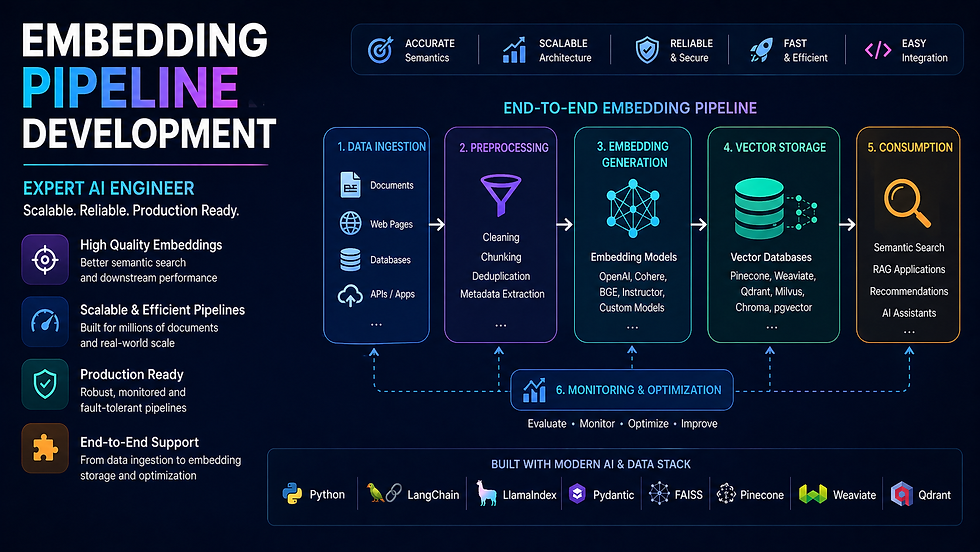
The embedding pipeline is the foundation of every AI search, RAG, and recommendation system. Build it wrong and every downstream component fails — poor retrieval, slow ingestion, ballooning API costs, and brittle pipelines that break on real data.
At Codersarts, our AI engineers build embedding pipelines that handle the real challenges: batch processing at scale, rate limit management, caching to eliminate redundant API calls, async parallelism for high throughput, and multi-modal support for text, images, and audio — all delivered as clean, documented, production-ready code.
Whether you are embedding 10,000 documents or 100 million, starting fresh or replacing a broken pipeline — we deliver the right architecture for your scale, budget, and stack.
10+ Embedding models supported | 100M+ Vectors pipeline-ready | < 4h First response | 48h Typical delivery | NDA Always available |
Why Most Embedding Pipelines Fail in Production
Most developers start with a simple loop: for each document, call embed(), store the vector. That works for 100 documents. At 100,000 it is slow. At 1 million it is broken. At 10 million it is a liability.
Common Failure | What Actually Happens | The Right Fix |
Single-threaded loop | Embedding 1M docs takes 14+ hours | Async parallel batching with concurrency control |
No batch grouping | 1 API call per document — rate limit hit instantly | Group into batches of 100–2,048 tokens per call |
No retry logic | Any API timeout fails the entire run silently | Exponential backoff with dead-letter queue |
No caching | Same content re-embedded on every pipeline run | Content-hash keyed cache (Redis or disk) |
Wrong token counting | Inputs silently truncated, losing document meaning | tiktoken / model tokeniser pre-validation |
No incremental update | Full corpus re-embedded on every content change | Dirty-flag or change-detection trigger pipeline |
Model-DB dimension mismatch | Inserts fail silently or corrupt the index | Validated dimension config at pipeline init |
No cost tracking | OpenAI bill arrives as a surprise | Token counter + cost estimator before each run |
What Our Embedding Pipeline Development Includes
✓ Batch embedding with optimal group sizing | ✓ Rate limit handling and exponential backoff |
✓ Async parallel embedding for high throughput | ✓ Embedding cache (Redis / disk, content-hash keyed) |
✓ Incremental re-embedding on content change only | ✓ Token pre-validation and truncation handling |
✓ Cost estimator before each large embedding run | ✓ Dimension validation before vector DB upsert |
✓ Dead-letter queue for failed embedding retries | ✓ Multi-modal pipeline (text + image + audio) |
✓ Model selection and benchmark testing | ✓ Vector DB upsert pipeline (batched + verified) |
✓ Embedding quality evaluation on your dataset | ✓ Full monitoring, logging, and alerting setup |
✓ FastAPI ingest endpoint with background task queue | ✓ Docker + cloud deployment (AWS, GCP, Azure, Render) |
1. Batch Embedding & Upsert Pipeline |
Batch Embedding — The Difference Between a Pipeline That Works and One That Scales
A naive embedding loop makes one API call per document and one vector DB write per vector. At any meaningful scale — 50,000+ documents — this approach is too slow, too expensive, and too fragile. Batch embedding groups documents into optimally sized batches, processes them in parallel, handles failures gracefully, and upserts vectors in bulk with verification.
We design the batch architecture around your specific combination of embedding provider, vector database, and document volume — so the numbers work before you run a single job.
What Our Batch Embedding Pipeline Covers
Batch size calculation: match model token limits (OpenAI: 2,048 inputs, Cohere: 96 texts, HuggingFace: hardware-limited)
Chunked document queue: pull from source DB or file system in configurable batch windows
Parallel batch processing with ThreadPoolExecutor or asyncio.gather — configurable concurrency cap
OpenAI rate limit management: tokens-per-minute and requests-per-minute tracking with automatic throttling
Exponential backoff with jitter on RateLimitError, APIConnectionError, and Timeout
Checkpoint system: save progress every N batches so the pipeline resumes from failure point
Bulk upsert to vector DB: Pinecone upsert(vectors, batch_size=100), Qdrant upload_collection, Weaviate batch.add_objects
Upsert verification: re-query a sample of inserted IDs to confirm successful indexing
Cost tracking: count tokens per batch, accumulate total, log estimated spend before and after each run
Progress bar and ETA logging for long-running jobs
Full batch pipeline service → Our Batch Embedding & Upsert Pipeline page covers checkpoint-resume architecture, parallel upsert patterns for each vector DB, and cost benchmarks for embedding 1M documents across OpenAI, Cohere, and HuggingFace. |
2. Embedding Caching Layer |
Embedding Cache — Eliminate Redundant API Calls and Cut Costs by Up to 80%
Every time you re-run your embedding pipeline — on a document that has not changed — you are paying for an API call you already made. For a corpus of 100,000 documents, this means you are re-spending the full embedding cost on every ingestion run, even if only 500 documents changed.
An embedding cache stores vectors keyed on a hash of the source content. If the content has not changed, the cache returns the stored vector instantly — zero API call, zero cost. We build caching layers that integrate invisibly into your existing pipeline.
What Our Caching Layer Covers
Cache key design: SHA-256 hash of (content + model_name + embedding_version) — collision-safe, model-aware
Redis cache backend: SET with TTL, GET with fallback to live API call, pipeline for bulk GET
Disk cache backend: SQLite or file-system for air-gapped or cost-sensitive environments
Cache hit rate monitoring: log cache hit %, API calls saved, cost saved per pipeline run
Cache invalidation strategy: TTL-based expiry, or explicit invalidation on content update
Warm-up pipeline: pre-populate cache from existing vector DB to avoid cold-start re-embedding
LangChain CacheBackedEmbeddings integration for seamless drop-in caching
Cache size management: LRU eviction policy, max memory cap, disk quota alerts
Multi-model cache: separate namespaces per embedding model so model switches do not cause cache collisions
Full caching service → Our Embedding Caching Layer page covers Redis vs disk cache tradeoffs, LangChain CacheBackedEmbeddings integration, cache invalidation patterns, and real cost savings benchmarks at different corpus sizes. |
3. Async Embedding Pipeline |
Async Embedding — Process 10x More Documents in the Same Time
A synchronous embedding pipeline processes one batch at a time: embed → wait for response → upsert → embed next batch. Each API round-trip adds 200–800ms of idle wait time. Multiply that by 10,000 batches and you have hours of wasted time doing nothing.
An async pipeline fires multiple embedding requests concurrently, processes responses as they arrive, and upserts to the vector DB in parallel — typically achieving 8–15x throughput improvement over a synchronous equivalent with the same API rate limits.
What Our Async Pipeline Covers
asyncio.gather() for concurrent batch embedding: fire N requests, await all, process results
Semaphore-based concurrency control: cap simultaneous in-flight requests to avoid rate limit burst
aiohttp / httpx async HTTP clients for non-blocking API calls to OpenAI, Cohere, HuggingFace
Async vector DB clients: pinecone-client async upsert, qdrant-client async upload, asyncpg for pgvector
Producer-consumer queue: asyncio.Queue separates document loading from embedding from upsert
Backpressure handling: pause producer when queue depth exceeds threshold to prevent memory overflow
Async retry with tenacity: @retry decorator with async support for API failures
Async progress tracking: tqdm.asyncio for live progress bars in async contexts
FastAPI background tasks: trigger async embedding pipeline via API endpoint without blocking the response
Celery + Redis task queue option for distributed embedding across multiple workers
Full async pipeline service → Our Async Embedding Pipeline Help page covers producer-consumer architecture, semaphore tuning for your rate limits, Celery distributed embedding setup, and throughput benchmarks comparing sync vs async at 100K, 1M, and 10M document scales. |
4. Multi-modal Embedding Pipeline (CLIP / Image / Audio) |
Multi-modal Embeddings — Search Across Text, Images, and Audio in the Same Index
Multi-modal embedding pipelines represent different data types in the same vector space — so you can search with a text query and retrieve images, search with an image and retrieve text, or combine text and visual signals for richer retrieval.
The most widely used multi-modal model is CLIP (Contrastive Language–Image Pretraining), which embeds text and images into a shared 512-dimension space. We build production CLIP pipelines for image search, product discovery, visual content moderation, and cross-modal RAG.
What Our Multi-modal Pipeline Covers
CLIP (ViT-B/32, ViT-L/14, ViT-H/14) setup with OpenCLIP and HuggingFace transformers
Image preprocessing pipeline: resize, normalize, batch encode with CLIPProcessor
Text-to-image search: embed query text → retrieve similar images from vector index
Image-to-image search: embed query image → find visually similar images
Cross-modal search: embed product description → retrieve matching product images
OpenAI DALL-E embedding integration for generative + search workflows
Whisper audio transcription → text embedding pipeline for audio search
ImageBind (Meta) for embedding images, text, audio, depth, IMU in unified space
Efficient image storage: S3 URL stored in vector DB metadata, image never stored in vector index
Scalable image batch encoding: GPU-accelerated with DataLoader and pin_memory
Vector DB setup for multi-modal: Qdrant named vectors, Weaviate multi2vec-clip module
Full multi-modal service → Our Multi-modal Embedding Pipeline page covers CLIP architecture in depth, GPU vs CPU throughput benchmarks, cross-modal search design patterns, and integration with e-commerce and content moderation use cases. |
5. Embedding Model Comparison & Selection |
Choosing the Wrong Embedding Model Silently Breaks Your Entire RAG or Search System
The embedding model is the single most consequential architectural decision in a vector search or RAG system. The wrong model for your language, domain, or query type produces embeddings that are semantically misaligned — and no amount of indexing, chunking, or reranking will fix it.
We benchmark embedding models against your actual data and query set — not synthetic benchmarks — and give you a justified recommendation with measured recall and latency figures.
Models We Benchmark and Implement
Model | Provider | Dims | Best For | Cost |
text-embedding-3-small | OpenAI | 1,536 | General RAG, multilingual, fast | ~$0.02/1M tokens |
text-embedding-3-large | OpenAI | 3,072 | Highest accuracy, complex domain queries | ~$0.13/1M tokens |
embed-english-v3.0 | Cohere | 1,024 | English RAG, best reranker pairing | ~$0.10/1M tokens |
embed-multilingual-v3.0 | Cohere | 1,024 | 100+ language RAG and search | ~$0.10/1M tokens |
all-MiniLM-L6-v2 | HuggingFace | 384 | Fast local inference, low resource cost | Free (self-host) |
BAAI/bge-large-en-v1.5 | HuggingFace | 1,024 | Best open-source English embedding | Free (self-host) |
BAAI/bge-m3 | HuggingFace | 1,024 | Multi-lingual, multi-granularity, hybrid | Free (self-host) |
e5-large-v2 | HuggingFace | 1,024 | Strong on asymmetric search tasks | Free (self-host) |
text-embedding-ada-002 | OpenAI | 1,536 | Legacy — use text-embedding-3-small instead | ~$0.10/1M tokens |
CLIP ViT-L/14 | OpenAI/OSS | 768 | Image + text multi-modal search | Free (self-host) |
What Our Model Selection Service Covers
MTEB leaderboard analysis filtered to your task type (retrieval, semantic similarity, classification)
Domain gap assessment: does a general model perform well on your specific content type?
Multilingual requirement check: which models genuinely support your language set
Benchmark run: embed 1,000 representative documents + 50 real queries with each candidate model
Recall@5 and Recall@10 measurement: how often does the right answer appear in the top results
Latency benchmark: p50 and p99 embedding time per batch for each model
Cost projection: full corpus embedding cost and per-query cost at your expected traffic
Written recommendation with justification: which model, why, and what you give up vs alternatives
Migration path: if you want to switch models later, how to re-embed without downtime
Full model selection service → Our Embedding Model Comparison & Selection page covers MTEB benchmark methodology, domain-specific fine-tuning options, cost vs accuracy tradeoff analysis, and a step-by-step guide to running your own benchmark before committing to a model. |
Embedding Pipeline Architecture — Three Patterns We Build
The right pipeline architecture depends on your data volume, latency requirements, and update frequency. Here are the three patterns we most commonly implement:
Pattern | When to Use | Key Components | Delivery Time |
Simple Batch Pipeline | One-time or weekly ingestion, < 500K docs | Batching + retry + upsert + cost tracking | 24–48 hours |
Cached Async Pipeline | Daily ingestion, 500K–10M docs, cost-sensitive | Async + cache + checkpoint + incremental update | 2–4 days |
Distributed Stream Pipeline | > 10M docs, real-time updates, multi-worker | Celery workers + Redis queue + async + monitoring + alerting | 5–10 days |
Not sure which pattern fits your scale? Tell us your document count, update frequency, and hosting constraints and we will design the right architecture before writing a line of code. |
Embedding Pipelines We Build Across Use Cases
✓ RAG knowledge base ingestion pipeline | ✓ E-commerce product catalogue embedding |
✓ Legal / medical document search pipeline | ✓ Customer support ticket embedding & search |
✓ Code search pipeline (CodeBERT, StarCoder) | ✓ Multi-language content embedding (100+ languages) |
✓ Real-time embedding on user-generated content | ✓ Image catalogue embedding (CLIP) for visual search |
✓ Audio transcription → embedding pipeline | ✓ News / article freshness pipeline (TTL-based) |
✓ Resume / CV matching embedding pipeline | ✓ Academic paper embedding for research search |
How We Build Your Embedding Pipeline — Our Process
Phase | What We Do | Output |
1. Discovery | Understand your data type, volume, update frequency, model preference, budget, and hosting | Requirements brief |
2. Model selection | Benchmark 2–3 candidate models on your data sample, measure recall and latency | Model recommendation + benchmark report |
3. Architecture | Design batch size, concurrency, cache strategy, upsert pattern, and monitoring approach | Architecture diagram |
4. Implementation | Build, test, and document the complete pipeline with edge case handling | Production-ready pipeline code |
5. Load test | Run the pipeline on your full dataset volume, measure throughput and cost, tune as needed | Load test report |
6. Delivery | Hand over source code, documentation, deployment guide, and walkthrough session | Full handover package |
Why AI Teams Choose Codersarts for Embedding Pipelines
✓ We benchmark models on your actual data — not theory | ✓ We have built pipelines from 10K to 100M+ documents |
✓ Every model and vector DB combination supported | ✓ Async, cached, distributed — all patterns covered |
✓ Cost estimation before every large run | ✓ Checkpoint-resume for long-running jobs |
✓ Incremental update — never re-embed unchanged content | ✓ Full monitoring and alerting included |
✓ NDA available before any code or data review | ✓ FastAPI ingest endpoint delivered with every pipeline |
✓ India-based pricing, global engineering quality | ✓ Ongoing support retainer available post-delivery |
Frequently Asked Questions
Q: We have 5 million documents. How long will embedding take and how much will it cost?
A: It depends on the model and your concurrency limit. With OpenAI text-embedding-3-small, 5M documents (average 500 tokens each) costs approximately $1,250 and takes 4–8 hours with a Tier 2 API key using our async pipeline. We run a cost estimate and timeline projection before you start — no surprises.
Q: Our embedding pipeline is running but retrieval quality is terrible. Can you fix it?
A: Yes. Poor retrieval quality after embedding is almost always caused by the wrong model for your domain, incorrect tokenisation leading to truncated inputs, or misaligned query and document embedding strategies. We run a diagnostic benchmark on your data, identify the root cause, and fix it.
Q: Can you add caching to our existing pipeline without rebuilding it?
A: Yes. The caching layer plugs in as a decorator around your existing embed() call. We add a content-hash lookup before each API call, store the result on the first call, and return the cached vector on subsequent calls. The change to your existing code is typically 10–15 lines.
Q: We want to use a free HuggingFace model to avoid OpenAI costs. Is the quality good enough?
A: For many use cases, yes. BAAI/bge-large-en-v1.5 and e5-large-v2 are within 5–8% of OpenAI text-embedding-3-small on standard retrieval benchmarks — and free to run. We benchmark both on your data so you can make the decision with real numbers, not guesses.
Q: Can the pipeline handle documents being added, updated, and deleted in real time?
A: Yes. We build a change-detection layer that monitors your source database for INSERT, UPDATE, and DELETE events — triggers re-embedding only for changed documents, and handles vector DB upsert and delete accordingly. The vector index stays in sync with your source of truth automatically.
Q: Do you support multi-modal pipelines for images alongside text?
A: Yes. We build CLIP-based pipelines that embed images and text into the same vector space. A user can search with a text query and retrieve images — or search with an image and retrieve similar images or text descriptions. We integrate this with Qdrant named vectors or Weaviate multi2vec-clip depending on your scale.
Q: What happens if the embedding API goes down mid-pipeline?
A: Our pipelines include checkpoint saves every N batches, exponential backoff on API failures, and a dead-letter queue for permanently failed batches. If the API goes down, the pipeline pauses and resumes from the last checkpoint when it comes back — no manual intervention, no data loss.
Ready to build an embedding pipeline that scales to your data and your budget? |
📋 Submit Project Brief Describe your embedding use case. Response in 4 hours. | 📞 Free Scoping Call 15 minutes. We scope your pipeline live, no commitment. | 💬 WhatsApp Us Urgent embedding build? Message us directly. |
Other Embedding & AI Pipeline Services We Offer
The embedding pipeline is one component of a larger AI system. If you need deeper help with a specific part of the pipeline — or the systems that sit around it — the pages below cover each area in full.
Embedding Pipeline Sub-services → Batch Embedding & Upsert Pipeline — checkpoint-resume, bulk upsert, cost tracking, all vector DBs → Embedding Caching Layer (Redis) — content-hash cache, LangChain integration, invalidation strategy → Async Embedding Pipeline Help — asyncio, producer-consumer queue, Celery workers, 10x throughput → Multi-modal Embedding Pipeline (CLIP) — text + image + audio in shared vector space → Embedding Model Comparison & Selection — MTEB benchmark on your data, recall & cost analysis |
Systems That Use Your Embeddings → RAG Pipeline Development — LangChain, LlamaIndex, any LLM, full retrieval-augmented generation → Vector Database Implementation Help — Pinecone, Weaviate, Qdrant, Milvus, pgvector, ChromaDB, Redis → Hybrid Search (Vector + BM25) Implementation — combine semantic and keyword search → Reranking Implementation Help — Cohere, cross-encoders, bge-reranker for better retrieval quality → Vector Search Performance Optimisation — HNSW tuning, quantization, latency debugging |
Production & Scale → Add AI Search to Existing Web App — integrate your embedding pipeline with a live product → Scalable Embedding Pipeline on AWS / GCP / Azure — cloud-native deployment with autoscaling → Vector DB Cost Optimisation & Scaling Plan — reduce embedding and storage costs at scale → Vector DB Job Support & Interview Prep — embedding pipeline system design for ML engineer interviews |
Not sure which service you need? Describe your data and use case on our contact page and we will point you in the right direction.
Codersarts — Embedding Pipeline Experts for AI Teams | ai.codersarts.com |


Comments