

Live Route Optimizer with Python


Any fleet operator running more than one depot runs into the same quiet problem. A driver’s route crosses another driver’s route twice on the same morning. A vehicle leaves half full because nobody checked capacity against demand before it was dispatched. A driver finishes the day and drives all the way back to a depot that is no longer the closest one
None of this is anyone’s fault. It is simply what happens when dispatch decisions, which vehicle goes where, and which stop comes before which, are made by hand, one shift at a time, with no way to see how a different plan would have compared.
What if the fleet and the route were worked out automatically, from a single file, and several planning approaches were compared side by side before the trucks ever left the depot?
That is exactly what the Live Route Optimizer does. In this post, we walk through what it is, how it works, and what each step of the process looks like.
What We Set Out to Build
Imagine a logistics client reaches out with a very specific need:
“We run several depots and a mixed fleet of vehicles. We want to upload our network once, have the system work out which vehicles we actually need to dispatch, and then optimize the delivery routes so we are not wasting fuel on crisscrossing paths and half-empty trucks.”
Breaking that down the way we would in a client meeting, the application needs to:
Accept a whole network from one file. The company, its depots, its vehicle fleet, its delivery stops, and the demand at each stop, all in a single CSV or Excel upload.
Work out the fleet automatically. Dispatch only as many vehicles as the total demand requires, and leave the rest on standby at their depot.
Let a dispatcher review and override that fleet. Toggle any vehicle between dispatched and standby before committing to it.
Show the unoptimized routes first, so the starting point is visible before anything is improved.
Optimize the routes, reordering the stops on each vehicle to cut distance and fuel cost, and show that happening live.
Compare more than one optimization approach on the same fleet and stops, and say plainly which one came out cheapest.
Keep every table editable, with search, sort, and pagination, so the data can be corrected without re-uploading the file.
If you dispatch a fleet from more than one depot and want the vehicle selection and the route planning worked out automatically, this is for you.
Tech Stack
The application runs on two things:
Python for the backend logic: the fleet constraints, the distance calculations, and the route optimization itself.
HTML, CSS, and JavaScript for the interface: the setup tables, the live route map, and the cost and comparison charts.
Application Overview
The Live Route Optimizer takes one input: a single file describing the company, its depots, its vehicle fleet, and its delivery stops with their demand.
From that one file, it proposes a fleet, dispatching only the vehicles needed to cover total demand, and then optimizes the delivery routes for that fleet. The output is a live route map and a cost comparison: the routes each vehicle should run, and how much distance and fuel cost were cut by optimizing them.
In short: a network file goes in, and a dispatched fleet with optimized, compared delivery routes comes out.
Features
The whole process takes only a few steps.
Upload the Network in One File
Open the application and download the setup template to see the format it accepts. Every row is tagged with a record type, company, depot, vehicle, stop, or product, so one file carries the entire network. Upload that file, as a CSV or an Excel file, and the company name, depots, vehicle roster, and delivery stops all appear at once.
The home screen

The setup screen after uploading the network file, showing the company name and depot cards, vehicle roster, and delivery stops
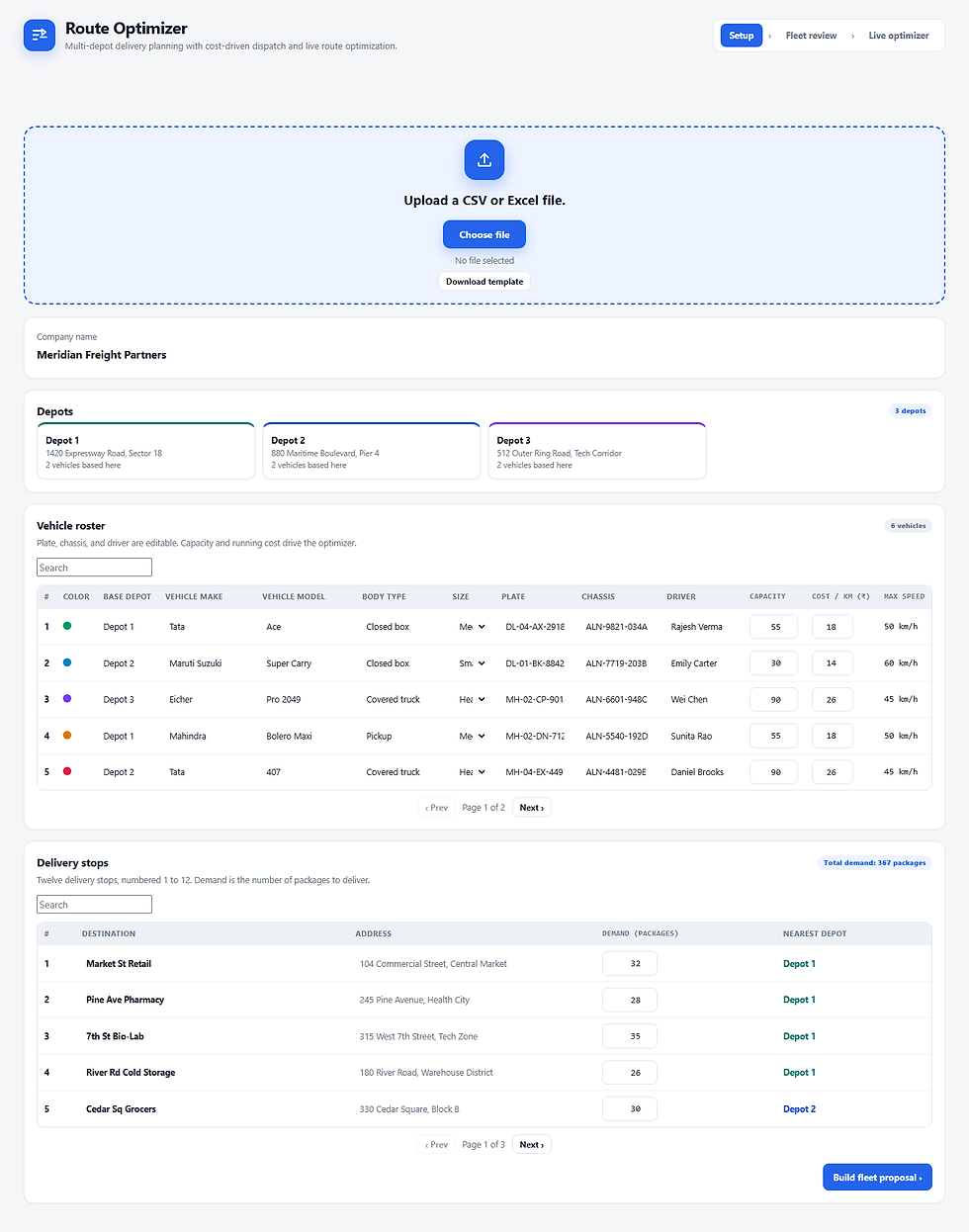
Build the Fleet Proposal
Click Build fleet proposal. The application adds up total demand and dispatches only the vehicles needed to cover it, leaving the rest on standby at their depot. A dispatcher can toggle any vehicle between dispatched and standby, or recalculate the proposal, before confirming it.
The fleet proposal, showing total demand, vehicles dispatched, and capacity used

See the Unoptimized Routes First
Confirming the fleet opens the live optimizer. Before anything is optimized, the map shows every dispatched vehicle’s unoptimized route, with the total distance, fuel cost, and a cost improvement of zero, since nothing has run yet. Hovering over a depot or a stop shows its details, and the legend can isolate a single vehicle’s path.
The live route map before optimization, showing the unoptimized routes

Run and Compare Optimization Approaches
Select an optimization approach, or leave Compare all algorithms selected to run all of them. Click Optimize routes, and the map animates each vehicle along the route currently being tested, while a log panel reports each move it tries and whether that move was accepted.
Optimization running, with the log reporting moves as they are tested and accepted

Read the Cost Trace and the Comparison
The Cost trace tab charts how each approach’s cost falls from the same starting plan, step by step. The Algorithm comparison tab lists every approach’s distance, fuel cost, and improvement against that same starting plan, with the cheapest one highlighted.
The cost trace chart, with one line per optimization approach

The algorithm comparison table, with the cheapest result highlighted

See the Best Result on the Map
Once every approach has finished, the live route map switches to the cheapest result, and names it directly on the map card, alongside the final distance, fuel cost, and overall cost improvement.
The live route map showing the best result after optimization

Advantages
One file sets up the whole network. Company, depots, vehicles, and stops all come from a single upload, not a separate screen for each one.
The fleet size is not guessed. Only as many vehicles as total demand requires are dispatched, and that can still be reviewed and overridden by hand.
A fair comparison. Every optimization approach is measured against the same starting plan, so their results are directly comparable, not each against its own baseline.
Transparent optimization. The log and the animated map show every move being tried, not just a final answer with no visibility into how it was reached.
Editable data throughout. Every table can be corrected in place, with search, sort, and pagination, instead of re-uploading the file for a small fix.
Limitations
It is important to be clear about its current scope:
Distances are straight-line, with a fixed allowance for real roads. They do not yet reflect actual road networks, traffic, or live road closures.
No live GPS or telematics integration yet. The routes are planned, not tracked against a vehicle’s actual position during the day.
None of these is a permanent limit, and each can be addressed in a custom build.
Future Scope of Improvements
Natural next steps include:
Real road routing, plugging in a live GIS routing API such as OpenStreetMap OSRM or Google Maps in place of the current straight-line distance estimate.
Cost-aware fleet selection, choosing the cheapest combination of vehicles that covers demand, not just the fewest of the largest ones.
Live telematics and GPS integration, so routes can react to traffic, road closures, and a vehicle’s actual position during the day.
ERP, TMS, and warehouse management integration, so the network data and the resulting dispatch plan flow directly from and into existing systems.
Reports and exports, such as a per-run optimization report comparing every approach, for dispatcher or head-office review.
Role-based access and audit trail, so different teams see the right depots and every fleet override is recorded.
Use Cases
E-commerce and last-mile delivery teams can plan multi-vehicle delivery batches from regional crossdocks.
Cold-chain and pharmaceutical logistics operators can route temperature-sensitive supplies under strict vehicle payload limits.
FMCG and retail distribution teams can balance multi-depot warehouse replenishment across dozens of stores without unnecessary return trips.
Third-party logistics providers can dispatch flexible, multi-size fleets while keeping idle vehicles on standby to protect margins.
Field service and utility fleets can route maintenance vehicles and technicians across service zones.
Who This Is For
Dispatchers and fleet operators running more than one depot
Logistics and supply chain teams evaluating a route optimization approach before a custom build
Third-party logistics providers managing mixed, multi-size fleets
Any business that dispatches vehicles from multiple locations to serve many delivery stops
Frequently Asked Questions
What does the fleet proposal actually decide?
It adds up the total demand across every delivery stop, then dispatches the largest vehicles first until their combined capacity covers that demand. Every vehicle not needed is left on standby at its depot, and a dispatcher can still override the result.
How are the different optimization approaches compared fairly?
Every approach starts from the same unoptimized plan. Their final cost, distance, and improvement are all measured against that same starting point, so the comparison table and the cost trace chart are directly comparable across approaches.
What file format does it accept for setup?
A CSV or an Excel file, with every row tagged by record type: company, depot, vehicle, stop, or product. A template can be downloaded from the app showing the exact columns it expects.
Can I correct the data after uploading it?
Yes. The vehicle roster and the delivery stops table are both editable in place, with search, sort, and pagination, so a value can be corrected without re-uploading the file.
Who builds this, and how do I get in touch?
This application is built by Codersarts, which delivers custom logistics and fleet dispatch applications for businesses. Reach out at contact@codersarts.com or visit www.codersarts.com.
Build a Live Route Optimizer Solution Tailored to Your Business
If you want this built for your business, Codersarts builds and delivers this application for enterprises, including:
End-to-end development of your own multi-depot route optimizer, with vehicle fleet profiles, constraint modeling, and dispatcher approval workflows
Architecture consulting for scale, supporting thousands of daily stops and live GPS tracking
Integration with your existing ERP, TMS, or warehouse management systems
It is simple to start. No long onboarding, just a discovery call to talk through your depots and your fleet.
Book a discovery call to get started.
Reach out at contact@codersarts.com or visit www.codersarts.com.
Exploring AI Resources
If you found this blog helpful, explore AI resources from CodersArts AI to see how organizations are applying these systems to real world applications.
OpenAI for Agentic AI: What You Need to Know Before Building AI Agents https://www.ai.codersarts.com/post/openai-for-agentic-ai-the-essential-guide
Build a Multi-Agent AI Banking Document Processing Platform with n8n https://www.ai.codersarts.com/post/build-a-multi-agent-ai-banking-document-processing-platform-with-n8n
Production Observability for AI Agents on AWS: Traces, Latency, Tokens, and Failures https://www.ai.codersarts.com/post/production-observability-for-ai-agents-on-aws-traces-latency-tokens-and-failures
Microsoft Agent Framework for Agentic AI: Everything You Need to Know https://www.ai.codersarts.com/post/microsoft-agent-framework-for-agentic-ai-everything-you-need-to-know


Comments