

Automate Lead Qualification in Dynamics 365: The Strategy & Execution Blueprint
.jfif/v1/fill/w_320,h_320/file.jpg)
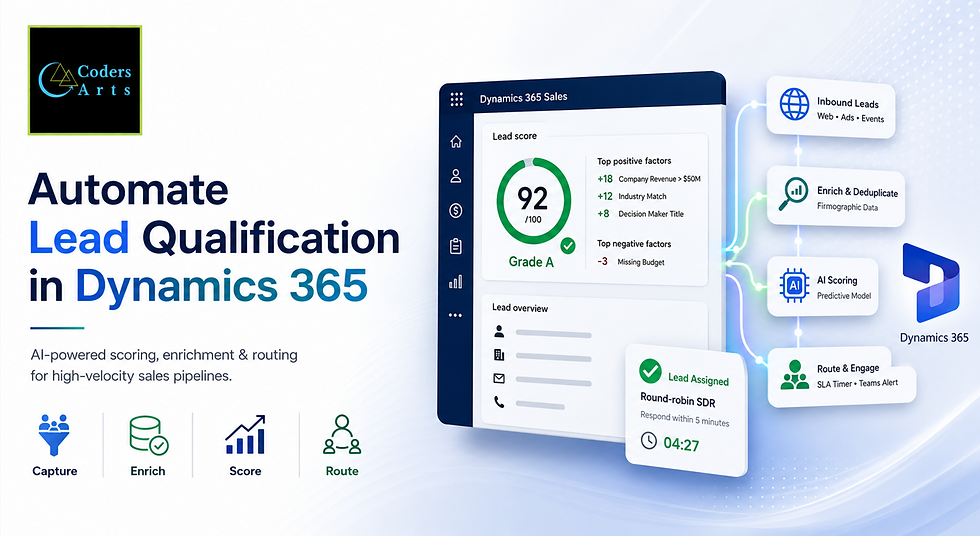
1. The Broken State of Enterprise Lead Management
In the high-stakes world of enterprise B2B sales, inbound leads are the primary fuel for revenue growth. Organizations invest millions of dollars annually in digital marketing, trade shows, webinars, content syndication, and paid acquisition to capture prospect intent.
Yet, inside the vast majority of enterprise sales organizations today, the moment a prospective buyer fills out a form, their inquiry enters a black hole of administrative friction.
1.1 The Lead Response Time Crisis: The 5-Minute Golden Rule
Landmark research published by the Harvard Business Review and MIT revealed a stark reality regarding inbound lead conversion: The probability of successfully contacting and qualifying a lead drops by 21x if the response occurs after 30 minutes versus within 5 minutes.
Speed-to-lead benchmarks demonstrate steep conversion drop-offs:
Response within 5 Minutes: 100x higher qualification rate compared to 30-minute responses.
Response after 30 Minutes: 21x drop in contact success rate.
Response after 24 Hours: Lead goes cold; prospect engages with a faster competitor.
If your enterprise responds to a high-intent buyer within 5 minutes, your SDRs are 100 times more likely to establish contact and qualify the prospect than if they wait just half an hour.
Despite this overwhelming empirical evidence, global B2B benchmarks indicate that the average enterprise response time for inbound sales inquiries is a staggering 42 hours. In fact, over 23% of enterprise B2B inquiries never receive a response at all. By the time a sales representative manually reviews a lead, researches the company, and crafts an email, the buyer has already booked a demo with a faster competitor.
1.2 Sales Representative Fatigue & Opportunity Cost
The root cause of lead response decay is not seller laziness; it is systemic operational tax.
Enterprise Account Executives (AEs) and Sales Development Representatives (SDRs) spend an estimated 65% of their working day on non-revenue-generating administrative tasks. On any given shift, a seller's focus is consumed by:
Manual Data Triage: Visually reading through hundreds of raw web-form submissions, personal Gmail/Yahoo addresses, and ambiguous job titles.
Firmographic Hunting: Searching LinkedIn, Google, and ZoomInfo to locate basic company metrics such as annual revenue, employee headcount, industry vertical, and corporate headquarters location.
Manual CRM Record Creation: Hand-keying contact details, company names, and notes into Dynamics 365 forms.
Tire-Kicker Chasing: Wasting valuable phone calls and personalized outreach on low-intent leads, students, job seekers, or competitors conducting mystery shopping.
When high-value sales reps spend hours sifting through low-quality lead stacks, they experience severe operational fatigue. High-intent enterprise buyers receive delayed, generic outreach, while low-quality leads receive undue attention, resulting in massive pipeline leakage.
1.3 Data Hygiene, CRM Rot, and Duplicate Accumulation
Manual lead entry inevitability creates bad data. When sellers manually key leads into Dynamics 365, human keystroke variances degrade CRM hygiene:
Company names are entered inconsistently (e.g., "General Electric", "GE Inc.", "General Electric Co.").
Phone numbers lack international country codes or standard formatting.
Inbound leads from existing enterprise accounts fail to map to the master Account record, creating orphaned records.
Duplicate leads accumulate when prospects fill out multiple content forms, confusing account ownership and frustrating buyers who receive conflicting outreach from different sellers.
1.4 The Subjectivity of Manual Lead Qualification
When lead qualification relies entirely on human judgment, consistency vanishes. One sales rep might qualify a lead based on a single recognizable company name, while another rep disqualifies a similar prospect because the job title sounded unfamiliar.
Without objective, automated qualification criteria grounded in historical win data, sales and marketing teams fall into perpetual alignment disputes. Marketing teams complain that Sales is ignoring valuable leads, while Sales teams complain that Marketing is sending useless traffic.
To scale revenue predictably, enterprise organizations must eliminate manual triage and replace subjective guesswork with an Automated, AI-Driven Lead Qualification Pipeline in Dynamics 365.
2. The Modern Solution Framework: AI-Driven Qualification in Dynamics 365
Microsoft Dynamics 365 Sales provides a modern, enterprise-grade architecture for automating lead qualification. By combining machine learning predictive models, real-time firmographic enrichment, and automated workflow orchestrations, enterprises transform lead triage from a manual bottleneck into an instant, automated competitive advantage.
2.1 The Paradigm Shift: From Static Rules to Predictive AI
Traditional lead scoring engines relied on rigid, hand-crafted point systems:
Add 5 points if the lead visits the pricing page.
Add 10 points if the job title contains 'Director'.
Subtract 20 points if the email domain is Gmail.
These static rule systems quickly become unmanageable. They fail to capture complex, non-linear buying signals and require constant manual recalibration as market dynamics shift.
Modern Dynamics 365 Lead Qualification replaces static rules with Predictive Machine Learning Models. Rather than guessing which criteria matter, Dynamics 365 Predictive Lead Scoring analyzes your historical CRM data, examining thousands of past qualified, disqualified, won, and lost deals to discover the exact combination of attributes and behaviors that correlate with actual revenue conversion.
2.2 Core Architectural Pillars of Enterprise Qualification

An automated enterprise lead qualification framework rests on four operational pillars:
Ingestion & Data Normalization Tier: Automatically captures incoming leads across all digital channels (web forms, event portals, LinkedIn Lead Gen, partner feeds), validates email syntax, normalizes phone formats, and maps fields cleanly into Dataverse.
Automated Enrichment & Deduplication Tier: Instantly queries external firmographic data providers (Clearbit, ZoomInfo, Dun & Bradstreet) to append revenue, headcount, tech stack, and industry codes, while checking Dataverse for duplicate records or existing parent Accounts.
AI Predictive Scoring & Intent Tier: Evaluates the enriched lead using Dynamics 365 Predictive Lead Scoring models and AI Copilot intent engines, assigning a numerical conversion score (0 to 100) and a quality grade (Grade A, B, C, D).
Intelligent Routing & SLA Enforcement Tier: Routes Grade-A leads instantly to the exact right seller based on territory, account ownership, or workload balance, enforcing strict 5-minute response SLA countdown timers with automated escalation alerts.
3. Core AI & Automation Capabilities in Dynamics 365 Sales
To execute automated lead qualification without writing custom software code, enterprise organizations leverage three primary native capabilities built directly into the Microsoft Power Platform and Dynamics 365 ecosystem.
3.1 Dynamics 365 Predictive Lead Scoring
Predictive Lead Scoring uses machine learning models trained specifically on your enterprise's Dataverse historical dataset.

Key operational mechanics of Predictive Lead Scoring include:
Model Training Thresholds: The predictive engine analyzes historical leads (requiring a minimum baseline of 40 qualified and 40 disqualified historical records) to identify patterns that lead sellers might overlook.
Score Grades: Leads are categorized into four distinct grades: Grade A (Score 80–100), Grade B (Score 60–79), Grade C (Score 40–59), and Grade D (Score 0–39).
Transparent Reason Codes: Unlike "black box" AI systems, Dynamics 365 explicitly displays the top positive and negative factors influencing each lead's score. For example, a seller can see that a lead scored 94 because the company's annual revenue exceeds $100M (+18 points) and the prospect holds a VP-level title (+14 points), despite using a non-standard job department (-2 points).
3.2 Automated Intent & Qualification Frameworks (BANT & MEDDPICC)
Beyond demographic scoring, qualification requires assessing sales readiness. Traditional qualification methodologies evaluate prospects against structured frameworks:
BANT: Budget, Authority, Need, Timeline.
MEDDPICC: Metrics, Economic Buyer, Decision Criteria, Decision Process, Identify Pain, Champion, Competition.
Dynamics 365 integrates Generative AI Copilot agents that automatically analyze prospect communications—such as form notes, email inquiries, and chat transcripts—to extract qualification indicators. The AI evaluates whether the prospect has explicitly stated a timeline, mentioned budget availability, or described an urgent operational pain point, automatically updating qualification fields in Dataverse.
3.3 Copilot for Sales & Contextual Summary Cards
Once a lead is qualified and assigned, sellers must prepare for initial outreach. Manually reviewing historical touchpoints, company news, and form submissions takes 15 to 20 minutes per lead.
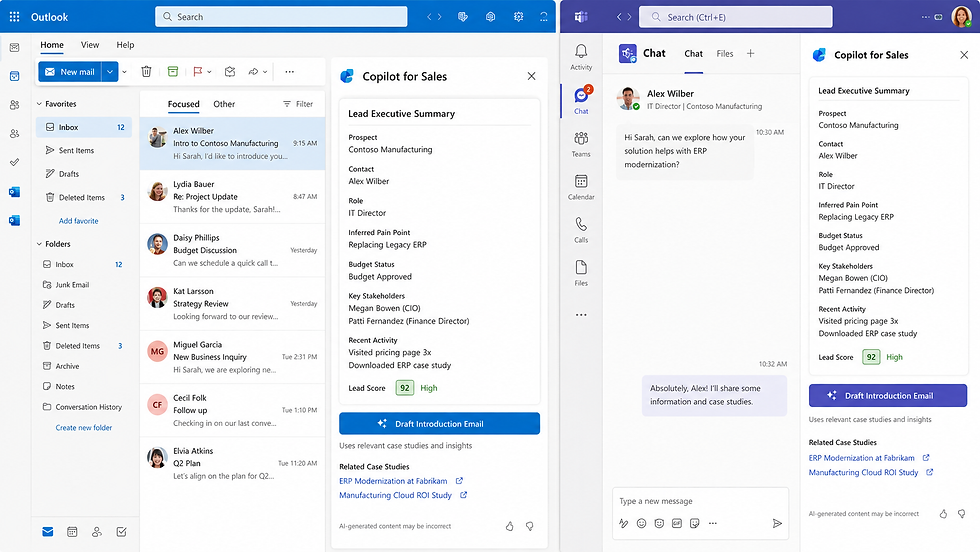
Copilot for Sales generates 1-click executive summaries directly inside Outlook and Teams. When an SDR opens a newly assigned Grade-A lead, Copilot provides a 3-bullet executive summary of the lead's business context, pain points, and suggested talk tracks, allowing sellers to initiate personalized, high-value conversations within seconds.
4. Enterprise Execution Blueprint & Process Architecture
Here is the step-by-step operational blueprint for implementing an automated lead qualification and routing engine inside Dynamics 365 Sales using native Power Platform capabilities.
The automated lead qualification lifecycle follows five sequential processing stages:
Inbound Signal Capture: Lead arrives via web form, LinkedIn ad, or event portal into Dataverse.
API Enrichment: Power Automate appends corporate revenue, headcount, and industry metrics.
Dataverse Deduplication: System matches existing Account/Contact records to prevent duplicates.
Predictive AI Scoring: Dynamics 365 calculates conversion probability (0-100) and assigns Grade A, B, C, or D.
Tiered Distribution:
Grade A (Score 80–100): Triggers instant round-robin SDR assignment with a 5-minute SLA countdown timer.
Grade B (Score 60–79): Enters standard SDR queue with a 2-hour response window.
Grade C/D (Score <60): Enters automated marketing nurture journeys in Dynamics 365 Customer Insights.
Step 1: Automated Ingestion & Instant Firmographic Enrichment
When an inbound lead is submitted via a corporate website form or partner portal, a automated Power Automate cloud flow triggers instantly upon record creation in Dataverse.
Syntax Validation: The workflow verifies email domain validity, filtering out disposable temporary email domains (e.g., @mailinator.com) or invalid formatting.
Firmographic API Query: The workflow calls an automated enrichment API (such as ZoomInfo, Clearbit, or D&B Dataverse connector) passing the prospect's email domain.
Attribute Appending: The enrichment provider returns corporate firmographics, which Power Automate automatically writes to Dataverse:
Annual Revenue (e.g., $120,000,000)
Employee Count (e.g., 1,200)
Industry Classification (e.g., Industrial Manufacturing)
Corporate HQ Location (e.g., Chicago, IL)
Installed Tech Stack (e.g., SAP S/4HANA, Salesforce, Azure)
Step 2: Real-Time Deduplication & Contact Matching
To prevent duplicate lead creation and preserve complete account history, the workflow executes a Dataverse lookup before score calculation:
Account Match Query: Search existing Dataverse Account records matching the prospect's corporate domain (e.g., @acme.com).
Parent Account Linking: If a matching Account exists, link the new Lead directly to the parent Account record, preserving existing account relationships, open opportunities, and territory ownership.
Duplicate Detection Rules: If an active Lead already exists for the same email address within a 30-day window, consolidate the new form submission as an updated activity timeline note rather than creating a duplicate record, notifying the assigned seller immediately.
Step 3: Predictive Scoring & AI Intent Evaluation
With enriched firmographic data and historical activity linked, Dynamics 365 evaluates the record against the trained Predictive Lead Scoring model:
Score Calculation: The machine learning model processes the lead attributes and calculates a conversion score (e.g., 91/100).
Grade Assignment: The system assigns the letter grade (Grade A).
Reason Code Generation: Key positive attributes (+18 High Revenue, +12 Target Industry) and negative attributes (-3 No Phone Provided) are logged to the Lead record fields.
Step 4: Dynamic Round-Robin Routing & SLA Enforcer
Once graded, high-priority leads must reach human sellers immediately without manual dispatching delays.


The automated routing engine executes the following logic:
Territory Matching: Match the lead's geographic country/state or account segment to the correct sales team queue (e.g., Enterprise NA - Midwest).
Round-Robin Distribution: Assign lead ownership to the next eligible SDR in the rotation who is currently logged in and has capacity based on active workload metrics.
Instant Multi-Channel Alerts: Send an immediate high-priority notification to the assigned seller via:
Microsoft Teams: An interactive card rendering the lead details, AI score, and a 1-click button to "Call Lead Now".
Mobile Push Notification: Alerting the seller on their Dynamics 365 Mobile application.
SLA Timer Activation: Initialize a 5-minute Service Level Agreement (SLA) Timer on the Dynamics 365 Lead record. If the seller does not log a phone call, email, or status change within 300 seconds, the workflow automatically reassigns the lead to a secondary manager and flags an SLA breach alert.
Step 5: Automated Nurture Sequences for Lower-Grade Leads
Not every lead is ready for an immediate sales call. Prospects scoring Grade C or Grade D (e.g., students, low revenue, long-term research) should not consume SDR time.
Automated Re-direction: Power Automate routes Grade-C and Grade-D leads directly into automated nurture journeys inside Dynamics 365 Customer Insights - Journeys (formerly Dynamics 365 Marketing).
Behavioral Monitoring: The prospect receives targeted educational email content, whitepapers, and webinar invites.
Dynamic Rescoring: If a Grade-C prospect subsequently downloads a pricing guide or registers for a product demonstration, the predictive engine automatically updates their score. When their score crosses the 80-point threshold, the system upgrades them to Grade A and triggers instant SDR routing.
5. Enterprise Governance, CRM Security, & Change Management
Deploying automated lead qualification requires aligning sales and marketing operations while enforcing strict CRM governance standards.
5.1 Sales-to-Marketing SLA Alignment
Automation fails if Sales and Marketing operate on conflicting lead definitions. Before activating predictive scoring, business leaders must formally establish a unified Lead
Lifecycle Taxonomy:
Marketing Engaged Lead (MEL): A prospect who has interacted with marketing content but has not yet undergone AI enrichment or scoring.
Marketing Qualified Lead (MQL): A lead whose firmographic profile and behavioral engagement generate an AI score of Grade B or higher (Score $\ge 60$).
Sales Accepted Lead (SAL): An MQL that has been assigned to an SDR and accepted within the 5-minute SLA window.
Sales Qualified Lead (SQL): A lead that has undergone initial discovery, met BANT/MEDDPICC criteria, and converted into an active Dynamics 365 Opportunity.
5.2 Human-in-the-Loop Override Controls
AI predictive models are designed to augment sellers, not replace their business judgment.
Seller Override Option: Sellers must retain the ability to manually override an AI lead score or qualification status if they possess offline context (e.g., a verbal conversation at an industry trade show).
Feedback Training Loop: When a seller manually qualifies a low-scoring lead or disqualifies a high-scoring lead, Dynamics 365 captures the explicit Disqualification Reason (e.g., "No Budget", "Competitor Research", "Wrong Contact"). These reason codes feed directly back into the next monthly predictive model retraining cycle, continuously improving model accuracy.
5.3 Dataverse Security & Field-Level Access Rules
Enterprise CRMs store sensitive financial, competitive, and customer data. Implementing lead automation requires strict security role configuration in Microsoft Dataverse:
Role-Based Access Control (RBAC): Ensure SDRs have read/write access only to leads within their assigned business unit or territory.
Field-Level Security: Restrict write permissions on critical automated fields (such as Predictive Lead Score, Grade, Enriched Revenue, and SLA Breach Status) to System Customizers and automated service principals, preventing manual tampering with AI audit metrics.
6. Comprehensive Financial ROI & Revenue Impact Model
Let's evaluate the operational unit economics of deploying an Automated AI Lead Qualification Pipeline in Dynamics 365 across an enterprise receiving 5,000 inbound leads per month.
Operational Baseline (Manual Processing):
Monthly Inbound Lead Volume: 5,000 leads / month.
Average Lead Response Time: 24 Hours.
SDR Time Spent Triage & Keying: 3.5 Hours / SDR / Day across 15 SDRs.
Initial Contact Rate (Response > 2 Hours): 18%.
Lead-to-Opportunity Conversion Rate: 4.2% (210 Qualified Opportunities / month).
Average Opportunity Deal Value: $45,000.
Monthly New Pipeline Generated: $9,450,000.
Post-Automation Impact (Dynamics 365 AI Pipeline):
Average Lead Response Time: 45 Seconds (for Grade-A leads).
SDR Administrative Time Spent: Reduced to 0.5 Hours / Day (3.0 hours/day reclaimed for active calls).
Initial Contact Rate (Response < 5 Mins): Increased to 58% (3.2x improvement).
Lead-to-Opportunity Conversion Rate: Increased to 8.5% (425 Qualified Opportunities / month).
Monthly New Pipeline Generated: $19,125,000.
Net Additional Monthly Pipeline: +$9,675,000 in new enterprise pipeline.
Comparative ROI Metrics Table
Operational Performance Dimension | Manual Enterprise Triage | Automated Dynamics 365 AI Pipeline | Business Advantage |
Speed-to-Lead (Grade-A Inbound) | 24 - 42 Hours | < 90 Seconds | 99.9% Latency Reduction |
SDR Daily Selling Time | 2.5 Hours / Day | 6.0 Hours / Day | 140% Increase in Live Prospect Time |
Firmographic Data Completeness | 42% (Missing fields) | 98% (Instant API Enrichment) | 100% Clean Dataverse Hygiene |
Duplicate Record Accumulation | 12% Duplicate Rate | < 0.2% (Real-Time Matching) | Eliminates Account Confusion |
Lead-to-Opportunity Win Rate | 4.2% Conversion | 8.5% Conversion | +102% Conversion Uplift |
Annual Pipeline Impact (5k Leads/mo) | $113.4 Million | $229.5 Million | +$116.1 Million New Annual Pipeline |
Implementation Cost & Payback | High Overhead | Low Cloud Compute | Payback Period < 14 Days |
Check out these other blogs from us which you might like
7. FAQs
Below are solutions to some questions encountered when automating lead qualification in Microsoft Dynamics 365 Sales.
Q1: How do you address machine learning model drift when market conditions or target buyer profiles change over time?
Answer: Machine learning predictive models can experience "model drift" if buyer behaviors shift (for example, during an economic downturn or when launching a new enterprise product line), causing older scoring parameters to degrade in accuracy.
To prevent model drift in production:
Automated Monthly Retraining: Configure Dynamics 365 Predictive Lead Scoring to execute an automated monthly model retraining schedule. The engine automatically incorporates the newest 30 days of qualified and disqualified outcome data.
Model Performance Monitoring: Monitor the model's ROC Curve (Receiver Operating Characteristic) and Area Under Curve (AUC) score in the Sales Insights admin portal. If the AUC score drops below 0.75, trigger a manual review of scoring fields.
Segmented Scoring Models: If your enterprise sells completely distinct product lines (e.g., SMB SaaS vs. Heavy Industrial Equipment), do not use a single global scoring model. Create separate predictive scoring models in Dynamics 365 filtered by Business Unit or Territory to ensure specialized accuracy.
Q2: How do you handle multi-channel lead attribution when a prospect submits multiple web forms across different marketing campaigns?
Answer: When a prospect interacts with multiple campaigns (e.g., attending a webinar, downloading a whitepaper, and requesting a pricing demo), naive automation can overwrite the original campaign source or create duplicate records.
To manage multi-channel attribution cleanly:
Use Dataverse Lead Source Mapping: Preserve the Original Lead Source (First Touch) in a immutable system field while updating Latest Campaign Touch (Last Touch) on the Lead timeline.
Activity Aggregation: Configure Power Automate to append new form submissions as Campaign Response activity records attached to the primary Lead object rather than spawning duplicate Lead entries.
Scoring Boosts: Ensure the predictive engine factors in Cumulative Engagement Frequency. A prospect who has engaged with 4 separate content assets over 14 days receives a compound behavior score boost.
Q3: What should an enterprise do if they lack the minimum 40 qualified and 40 disqualified historical leads required to train the Dynamics 365 Predictive Scoring model?
Answer: Early-stage business units or new Dynamics 365 deployments may lack sufficient historical CRM data volume to train machine learning models immediately.
In this scenario, execute a 2-Phase Crawl-Walk-Run Strategy:
Phase 1 (Heuristic Rule-Based Scoring): Build a simple, rule-based scoring engine using Power Automate and Dataverse calculated columns based on baseline firmographic attributes (e.g., Revenue > $10M = +20 pts, Target Job Title = +20 pts).
Phase 2 (Predictive Transition): As sales reps process leads over 3 to 6 months, Dynamics 365 will accumulate the required 40 qualified and 40 disqualified outcome records. Once reached, activate Predictive Lead Scoring to transition seamlessly from static heuristics to machine learning.
Q4: How do you handle complex matrixed global territory routing where lead assignment depends on geography, product line, and seller availability simultaneously?
Answer: Basic round-robin assignment fails when enterprise territory structures involve multi-variable matrix rules (e.g., "US West Coast + Medical Devices + Enterprise Tier >$100M").
To execute matrixed routing without custom code:
Dataverse Territory Matrix Table: Create a custom configuration table in Dataverse storing your organization's territory definitions, product mappings, and assigned SDR queues.
Power Automate Lookup: When a Grade-A lead is qualified, the automated flow performs a relational lookup against the Territory Matrix table using the lead's enriched state, industry, and revenue values.
Dynamics 365 User Availability Check: Before assigning the lead, query the seller's active working hours and Microsoft Teams presence status (Available, Busy, In a Meeting, Out of Office). If the primary seller is out of the office, the system automatically routes the lead to the designated secondary coverage seller within 60 seconds.
Q5: How do you overcome sales representative resistance to AI-driven lead scoring and automated routing?
Answer: Change management is often the hardest part of enterprise CRM deployment. Sellers may distrust AI scores or feel that automated routing removes their autonomy.
To drive 100% seller adoption:
Radical Scoring Transparency: Never present AI scores as an unexplained number. Ensure sellers can see the explicit Reason Codes (e.g., "+18 High Revenue", "+12 Target Title") directly on the Dynamics 365 main form.
Focus on Time-Saved: Frame the automation around seller empowerment: "The AI handles the administrative keying and filters out 80% of spam so you can focus strictly on high-intent buyers who want to talk."
Incentivize SLA Compliance: Incorporate speed-to-lead metrics (percentage of Grade-A leads contacted within 5 minutes) into quarterly sales compensation and leaderboard gamification.
8. Partnering with Codersarts for Enterprise Deployment
While Dynamics 365 and Power Platform provide powerful native capabilities out of the box, deploying a resilient, secure enterprise lead qualification pipeline requires deep CRM architecture and cloud orchestration expertise:
Configuring advanced Dataverse solution architectures & multi-environment ALM pipelines.
Building custom API connectors for legacy ERPs, ZoomInfo, Clearbit, or D&B.
Optimizing Predictive Lead Scoring machine learning models and custom AI Copilot agents.
Engineering complex round-robin territory assignment algorithms and Teams SLA alert engines.
That is precisely why market-leading enterprises partner with Codersarts AI.
Why Commercial Leaders Choose Codersarts AI
At Codersarts AI, we specialize in building bespoke enterprise CRM automations, Dynamics 365 architectures, custom AI agents, and Power Platform solutions.
Senior Solutions Architecture: We provide senior Microsoft Dynamics 365 architects, Power Platform experts, and AI enterprise engineers.
35% to 55% Cost Advantage: We deliver high-velocity enterprise engineering at a fraction of typical US consulting agency rates.
Turnkey Delivery: From initial CRM data auditing and predictive model training to full SDR team onboarding, we deliver production-ready systems that scale.
"Stop letting high-intent buyers go cold in administrative queues. Automate your Dynamics 365 pipeline and capture speed-to-lead advantage."
Visit Codersarts today to schedule a technical architecture session with our enterprise Dynamics 365 specialists.


Comments